Save your own copy
Use File > Save As in Excel. Keep the original workbook for next time.
Your getting-started guide
Check a small manually pasted dataset before analysis. Row-level checks explain each issue, while an overview counts affected records and issue types without deleting source data.
Your first five minutes
Paste values into A8:E107. Each record needs an ID, name, email, segment, and nonnegative numeric amount.
See the fields in RecordsChange A9 from REC-001 to REC-002. Both duplicate flags clear; other issues remain visible.
See the fields in RecordsReview the counts, then filter Records by Review. Resolve issues in the source before using the data.
See the fields in OverviewAmber: your entries. Type your information here.
Green: calculated results. Keep these formulas.
Status colors can change as you work. Use the field instructions below to confirm what you can edit.
Follow along in your copy
The workbook already contains illustrative records so you can see how it works. Find these cells, make a small change following the first steps, and review the result before entering your own information.
These are sample values. Replace or clear the amber example cells before relying on your totals.
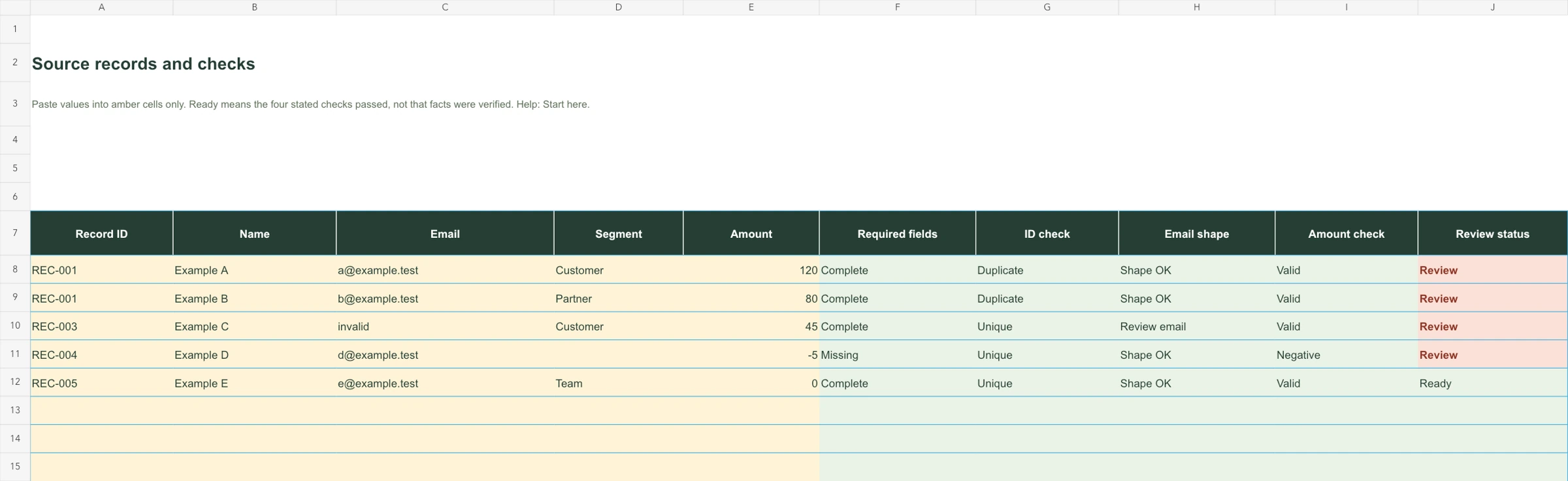 Open the worksheet preview
New to spreadsheets?
Use File > Save As in Excel. Keep the original workbook for next time.
Click a tab at the bottom to open it. B7 means column B, row 7.
Click an amber cell, type, and press Enter. Press Tab to move right.
Use the arrow on a validated cell to choose one of the listed options.
Use real dates and numeric amounts. Enter 50% for half. Keep the existing formats.
Use Ctrl+Z on Windows or Command+Z on Mac. Keep formulas, which start with =.
Keep this beside your workbook
See records ready for review and counts by issue type; a row can have several issues.
| Field and cells | What to do |
|---|---|
| Records entered (B5) | Counts nonempty source rows, including partially entered rows. |
| Ready (B6) | Rows passing the four stated checks. |
| Issue type (A10) | Counts affected rows per check; counts can overlap. |
Paste values into five input fields and review each formula-driven check.
| Field and cells | What to do |
|---|---|
| Record ID (A8) | Stable unique identifier; duplicate detection is case-insensitive. |
| Name (B8) | Required text. |
| Email (C8) | Required; shape check only looks for @ and a dot. |
| Segment (D8) | Required category label. |
| Amount (E8) | Enter a nonnegative number; numeric-looking text is flagged. |
Make it part of your routine
All populated records are fictional. Replace or clear amber examples before using totals.
100 records and five fixed fields. Email checks only test basic shape, not deliverability or full syntax. No automatic cleaning, external validation, or database connection.
Leave unknown values blank. Enter 0 for a confirmed zero. Read missing-input messages before using a result.
Beyond prepared capacity, extend formulas, validation, summary ranges, and chart ranges together.