Save your own copy
Use File > Save As in Excel. Keep the original workbook for next time.
Your getting-started guide
Compare rental opportunities on a consistent annual basis. The comparison links to each property’s acquisition cost and operating calculations, so every yield can be traced to its assumptions.
Your first five minutes
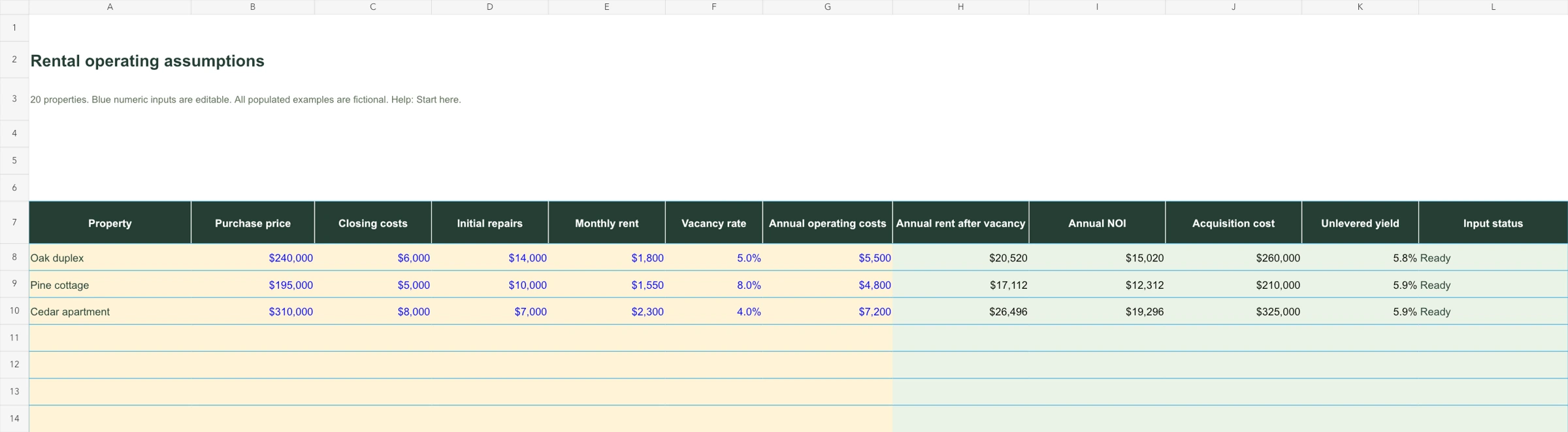
Replace the fictional properties in rows 8–27. Enter purchase price, closing costs, initial repairs, monthly rent, vacancy, and annual operating expenses.
See the fields in PropertiesTry changing monthly rent in E8 from 1800 to 2000. Annual rent and NOI increase by $2,280 at 5% vacancy.
See the fields in PropertiesCompare NOI with total acquisition cost. Read input warnings before using a yield.
See the fields in ComparisonAmber: your entries. Type your information here.
Green: calculated results. Keep these formulas.
Status colors can change as you work. Use the field instructions below to confirm what you can edit.
Follow along in your copy
The workbook already contains illustrative records so you can see how it works. Find these cells, make a small change following the first steps, and review the result before entering your own information.
These are sample values. Replace or clear the amber example cells before relying on your totals.
 Open the worksheet preview
New to spreadsheets?
Use File > Save As in Excel. Keep the original workbook for next time.
Click a tab at the bottom to open it. B7 means column B, row 7.
Click an amber cell, type, and press Enter. Press Tab to move right.
Use the arrow on a validated cell to choose one of the listed options.
Use real dates and numeric amounts. Enter 50% for half. Keep the existing formats.
Use Ctrl+Z on Windows or Command+Z on Mac. Keep formulas, which start with =.
Keep this beside your workbook
Compare acquisition cost, annual NOI, and unlevered yield for up to 20 properties.
| Field and cells | What to do |
|---|---|
| Property (A8) | Links to the property name. |
| Acquisition cost (B8) | Purchase price plus closing costs and initial repairs. |
| Yield (D8) | Annual NOI divided by acquisition cost; n.a. when cost is zero. |
Enter costs, rent, vacancy, and annual operating expenses; review the linked calculations.
| Field and cells | What to do |
|---|---|
| Property (A8) | Use one distinct property name per row. |
| Purchase price (B8) | Enter the purchase price in USD. |
| Closing costs (C8) | Enter one-time acquisition costs in USD. |
| Initial repairs (D8) | Enter initial capital work in USD, separate from annual expenses. |
| Monthly rent (E8) | Potential monthly rent before vacancy. |
| Vacancy (F8) | Enter a rate between 0% and 100%. |
| Annual operating expenses (G8) | Include recurring operating costs. Exclude debt, tax on income, depreciation, and initial repairs. |
Make it part of your routine
All populated records are fictional. Replace or clear amber examples before using totals.
20 properties. A simple annual, unlevered comparison; no mortgage, tax, appreciation, sale proceeds, or discounted cash-flow model. All examples are fictional.
Leave unknown values blank. Enter 0 for a confirmed zero. Read missing-input messages before using a result.
Beyond prepared capacity, extend formulas, validation, summary ranges, and chart ranges together.