Save your own copy
Use File > Save As in Excel. Keep the original workbook for next time.
Your getting-started guide
Model one rental investment and change its rent, vacancy, costs, down payment, or fixed-rate loan assumptions. Annual cash-on-cash ROI divides cash left after operating costs, mortgage payments, mortgage insurance, and capital reserves by your upfront cash investment.
Your first five minutes
Replace the fictional inputs in B7:B14 and B16:B17. Use a 100% down payment for an all-cash purchase. Loan interest and term are required only for a financed purchase.
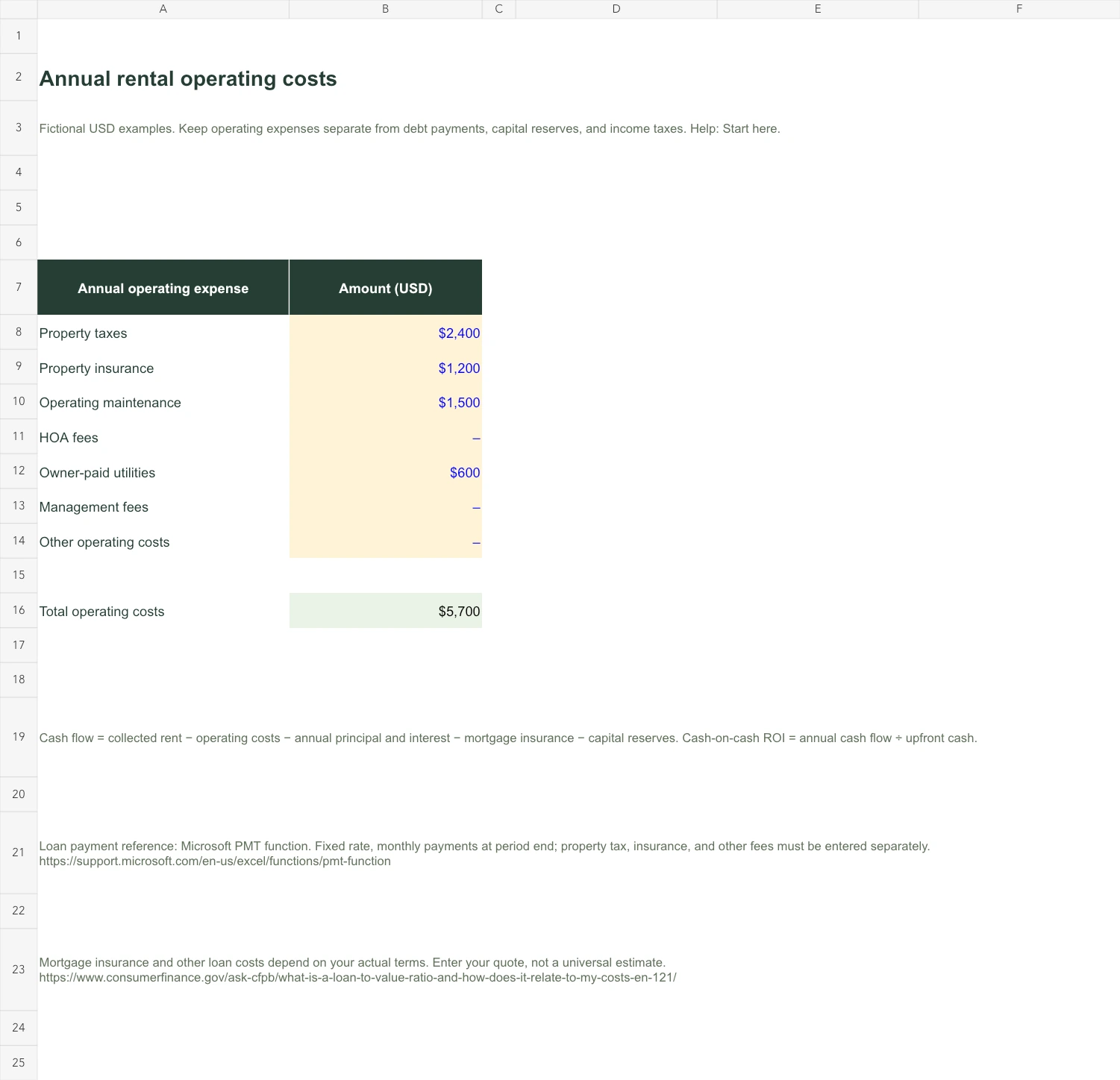
See the fields in CalculatorReplace all seven cost amounts in B8:B14. Enter 0 for a confirmed zero. Do not put principal payments, income tax, or capital reserves in operating expenses.
See the fields in CostsChange monthly rent in B13 or vacancy in B14. Compare annual cash flow, cash-on-cash ROI, and the nine sensitivity results. Every scenario reuses the model’s debt and annual cash-cost totals.
See the fields in CalculatorAmber: your entries. Type your information here.
Green: calculated results. Keep these formulas.
Status colors can change as you work. Use the field instructions below to confirm what you can edit.
Follow along in your copy
The workbook already contains illustrative records so you can see how it works. Find these cells, make a small change following the first steps, and review the result before entering your own information.
These are sample values. Replace or clear the amber example cells before relying on your totals.
 Open the worksheet preview
New to spreadsheets?
Use File > Save As in Excel. Keep the original workbook for next time.
Click a tab at the bottom to open it. B7 means column B, row 7.
Click an amber cell, type, and press Enter. Press Tab to move right.
Use the arrow on a validated cell to choose one of the listed options.
Use real dates and numeric amounts. Enter 50% for half. Keep the existing formats.
Use Ctrl+Z on Windows or Command+Z on Mac. Keep formulas, which start with =.
Keep this beside your workbook
Enter acquisition, financing, rent, vacancy, reserves, and mortgage insurance. Review cash flow and a formula-driven nine-case sensitivity grid.
| Field and cells | What to do |
|---|---|
| Purchase price (B7) | Property acquisition price in USD. |
| Closing costs (B8) | Upfront cash closing and loan fees, in USD. |
| Initial repairs (B9) | Upfront renovation cash, separate from annual reserves. |
| Down payment (B10) | Percentage of purchase price funded with cash. 100% means no loan. |
| Annual interest (B11) | Fixed nominal annual loan rate. Monthly payments use this rate divided by 12. |
| Loan years (B12) | Whole number of amortization years; 1–50 when financed. |
| Monthly rent (B13) | Potential rent before vacancy. No automatic rent growth. |
| Vacancy (B14) | Lost-rent share, between 0% and 100%. |
| Annual capital reserve (B16) | Annual cash set aside for capital work; deducted after NOI. |
| Annual mortgage insurance (B17) | Enter any annual mortgage insurance or recurring loan fee; 0 if none. |
| Cash-on-cash ROI (G17) | Annual cash flow after debt and reserves divided by upfront cash. Excludes appreciation, sale, principal equity buildup, and income tax. |
Maintain seven annual operating-cost inputs and review the calculation definitions and sources.
| Field and cells | What to do |
|---|---|
| Property taxes (B8) | Annual property taxes in USD; these are operating expenses. |
| Insurance (B9) | Annual property insurance, excluding mortgage insurance. |
| Maintenance (B10) | Annual operating maintenance expense. Capital work belongs in acquisition or reserves. |
| HOA (B11) | Annual association or common-area fees. |
| Utilities (B12) | Annual owner-paid utilities. |
| Management (B13) | Annual cash management fee based on your own quote. |
| Other operating costs (B14) | Other annual operating expenses; exclude debt and income taxes. |
Make it part of your routine
All populated records are fictional. Replace or clear amber examples before using totals.
One property, annual steady-state cash flow, fixed-rate fully amortizing monthly debt, and nine rent/vacancy sensitivity combinations. No appreciation, sale, principal equity buildup, income tax, rent growth, loan qualification, or multi-year return model. Cash-on-cash ROI is not total investment return.
Leave unknown values blank. Enter 0 for a confirmed zero. Read missing-input messages before using a result.
Beyond prepared capacity, extend formulas, validation, summary ranges, and chart ranges together.