An aging report should group what is still owed, not the original value of every overdue invoice. A fully paid invoice belongs outside the collection queue even if its due date is old.
Use a visible review date so a saved report can be reproduced. TODAY is useful for a live tracker, but a fixed date is easier to reconcile at month end.
Free tutorial for small teams and spreadsheet users. Examples use English-language formulas. Modern Excel is the workbook’s target app; Google Sheets imports require feature checks. Optional templates are separate one-time purchases with their own capabilities, limits, and terms on the linked product page.
01
Start with the invoice and payment records
Create Invoice ID, Customer, Due date, Invoice amount, Paid amount, Balance, Overdue days, and Aging bucket in A7:H7. Put the review date in B2. Keep due dates as dates and amounts as numbers.
For the example review date of October 31, an invoice due October 1 for $1,000 with $250 paid has a $750 balance and is 30 days overdue. Record the aggregate paid amount only if the payment detail can be reconciled elsewhere.
02
Calculate the balance before aging
In F8, subtract paid amount from invoice amount after checking both inputs are present. Enter a confirmed zero paid amount for an unpaid invoice. A missing payment record is not confirmation that no payment occurred.
If paid exceeds invoiced, preserve the negative balance and flag it for review as a possible credit or entry issue. Do not silently clamp every balance to zero and hide the discrepancy.
=IF(OR(D8="",E8=""),"",D8-E8)03
Apply the review date and aging boundaries
For a positive outstanding balance with a valid due date, overdue days are the larger of zero and review date minus due date. Group 1–30, 31–60, 61–90, and over 90 days. Zero days means not overdue; the due date itself is day zero.
Keep missing amounts or dates visibly incomplete before assigning a bucket. The following formula is for a row whose positive balance and due date have already been validated.
=MAX(0,$B$2-C8)04
Reconcile and test the boundaries
Sum positive balances by aging bucket and reconcile that total to the positive outstanding balances in the source. Keep customer credits separate. A report that includes fully paid invoice amounts will overstate collection needs.
Test invoices that are 0, 1, 30, 31, 60, 61, 90, and 91 days overdue. Then change the $250 payment to $1,000: the example should leave the unpaid collection queue. This tracker records payments manually; it does not collect money or send reminders.
Follow the example
Follow a partially paid invoice through settlement
Northstar Goods owes $4,850 on INV-1042 and has paid $2,000, leaving $2,850. Recording the full $4,850 as cumulative paid clears that balance, changes the status to Paid, and reduces total outstanding from $11,150 to $8,300.
Fictional example using the shipped Excel workbook. Worksheet captures show the example inputs and results; follow-along changes are described below.
Identify the customer
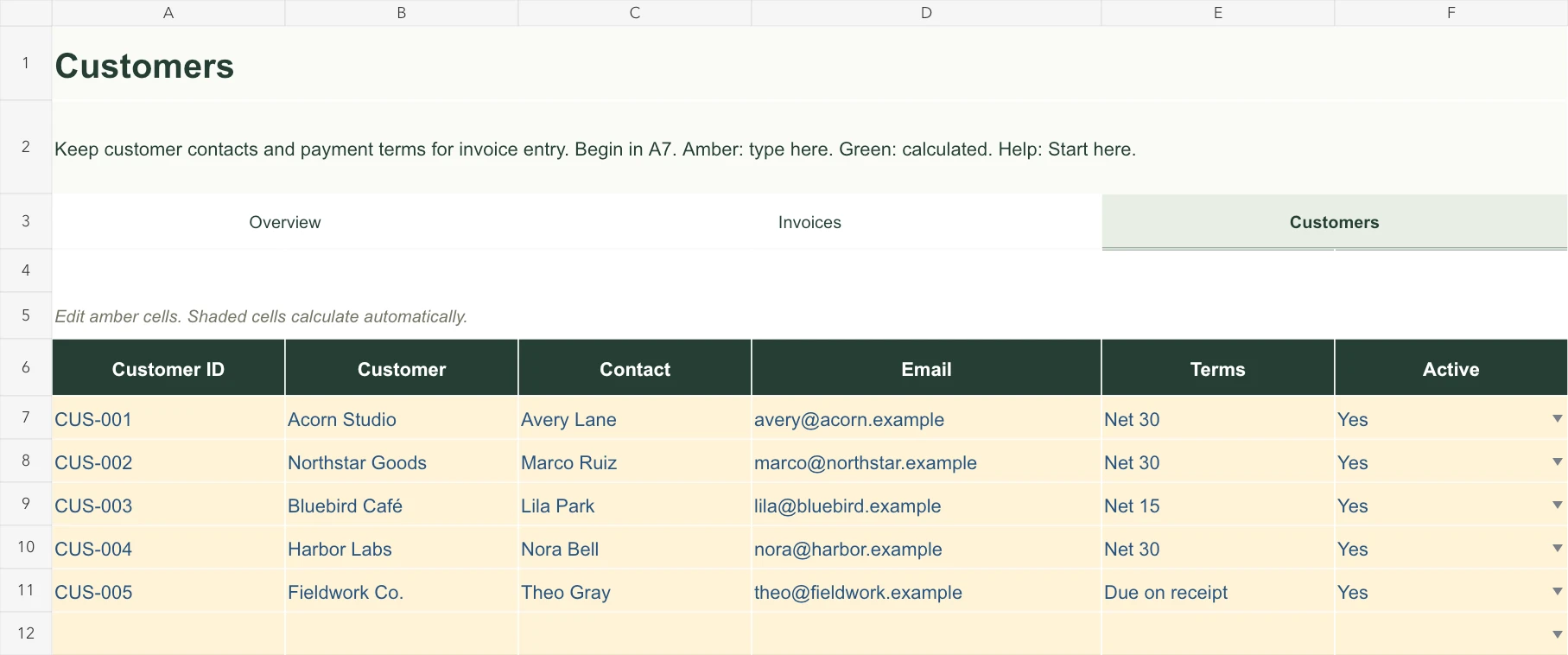
The fictional Customers sheet stores Northstar Goods on row 8.
- Review Customers!B8:E8 for the customer, contact, email, and Net 30 terms. This directory supplies the invoice customer dropdown.
 Open full-size worksheet
- Customers!B8:E8 identifies the customer and payment terms.
Track the unpaid part of the invoice
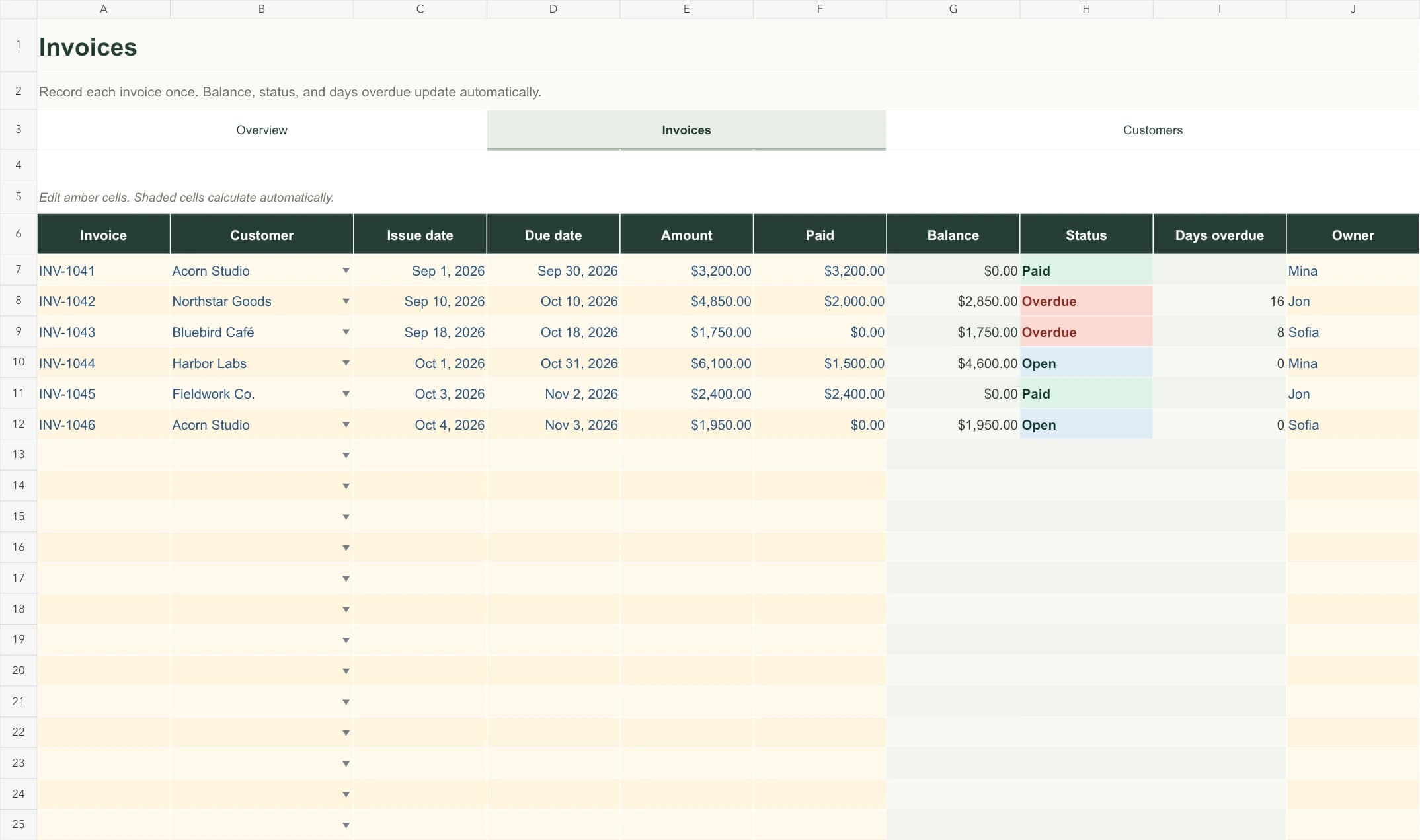
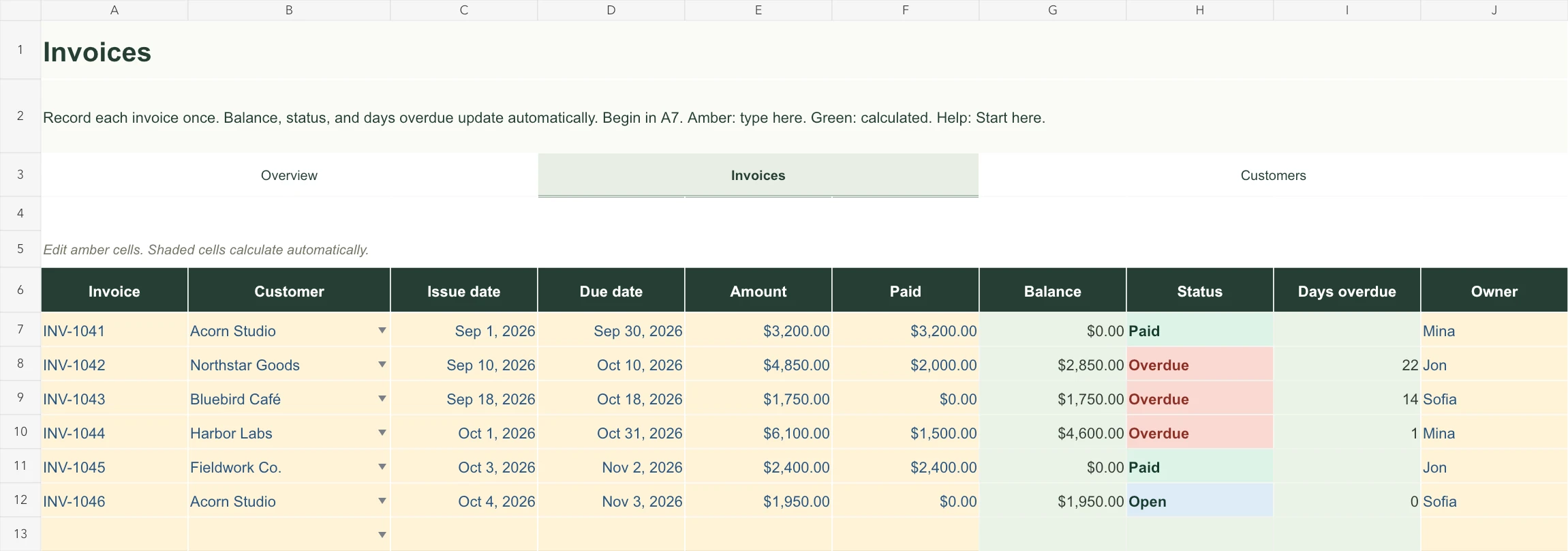
INV-1042 is on Invoices row 8.
- E8 is 4850 invoiced and F8 is 2000 paid. G8 calculates 2850 outstanding.
- The due date is October 10, 2026. Overdue days use the date the workbook recalculates; the screenshot is an illustration, not a fixed age to copy.
 Open full-size worksheet
- E8:F8 records invoiced and cumulative paid amounts.
- G8 is the calculated $2,850 balance. I8 changes with today’s date.
Record the final payment and reconcile
A further $2,850 payment settles INV-1042.
- Set Invoices!F8 to 4850, the new cumulative paid amount. Do not replace it with only the latest $2,850 receipt.
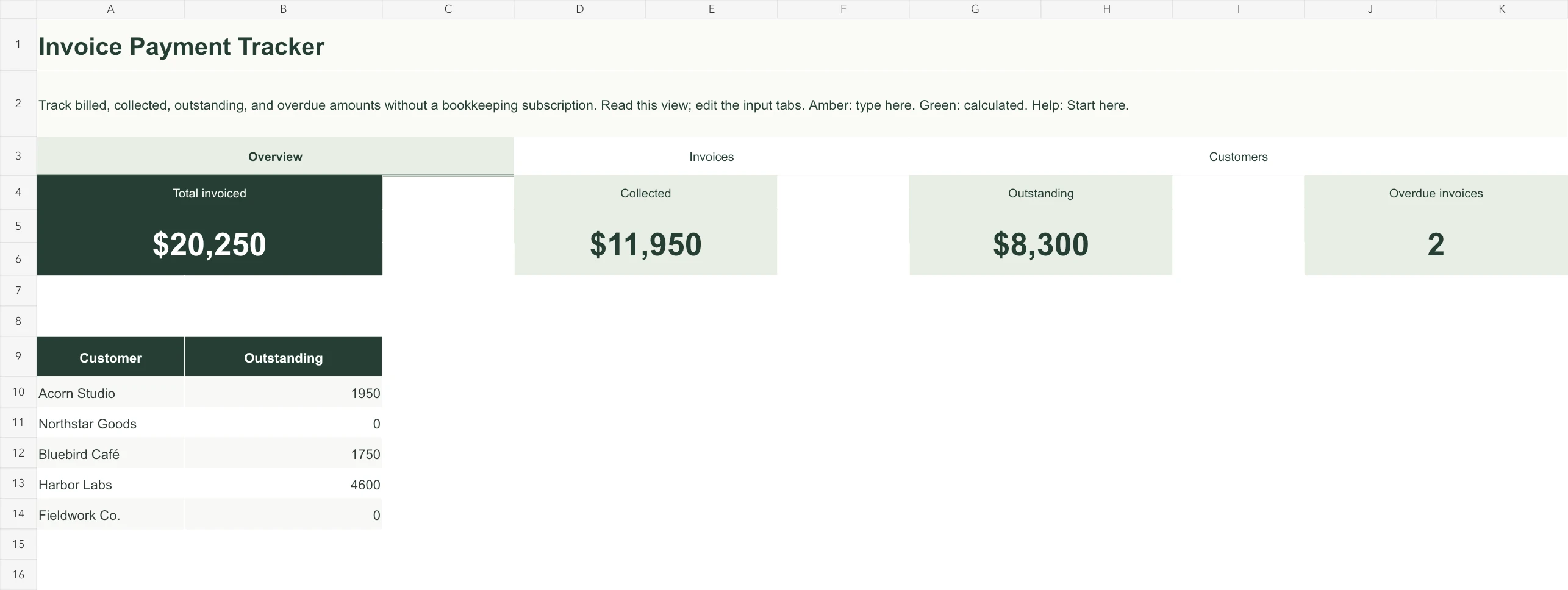
- G8 becomes 0 and H8 becomes Paid. Dashboard!G5 becomes 8300, and Northstar Goods’ summary balance in B11 becomes 0.
 Open full-size worksheet
- Outstanding falls by $2,850 to $8,300.
- The Northstar Goods row now shows zero outstanding.
Building your own? Apply the formulas and structure in this tutorial. The optional workbook uses the exact cells and limits shown in this example.
Evaluate the prepared workbook Already have it? Follow the workbook instructionsSkip the blank-sheet setup
Invoice Payment Tracker
An invoice register, automatic aging status, and customer-level receivables summary.FAQ
Common questions
Is a 30-day-old invoice always 30 days overdue?
No. Overdue days start from the due date. An invoice issued 30 days ago may not yet be due.
Should I age the full invoice after a partial payment?
Age the remaining unpaid balance. Keep the payment history available to explain how the balance was calculated.