Save your own copy
Use File > Save As in Excel. Keep the original workbook for next time.
Your getting-started guide
Build a monthly loan repayment schedule from principal, interest, term, and the first payment date. Review how recurring and one-off extra principal affect total interest, actual payment count, and the remaining balance.
Your first five minutes
Enter principal in B7, nominal annual rate in B8, term in months in B9, first payment date in B10, and recurring extra principal in B11.
See the fields in LoanEnter any one-off extra principal in F8:F367. Blank means none. Extra principal is applied on that payment date and capped at the remaining amount owed.
See the fields in ScheduleReview actual interest, payment count, and the terminal balance. Update assumptions to explore another repayment plan; keep a separate copy when you need to retain it.
See the fields in LoanAmber: your entries. Type your information here.
Green: calculated results. Keep these formulas.
Status colors can change as you work. Use the field instructions below to confirm what you can edit.
Follow along in your copy
The workbook already contains illustrative records so you can see how it works. Find these cells, make a small change following the first steps, and review the result before entering your own information.
These are sample values. Replace or clear the amber example cells before relying on your totals.
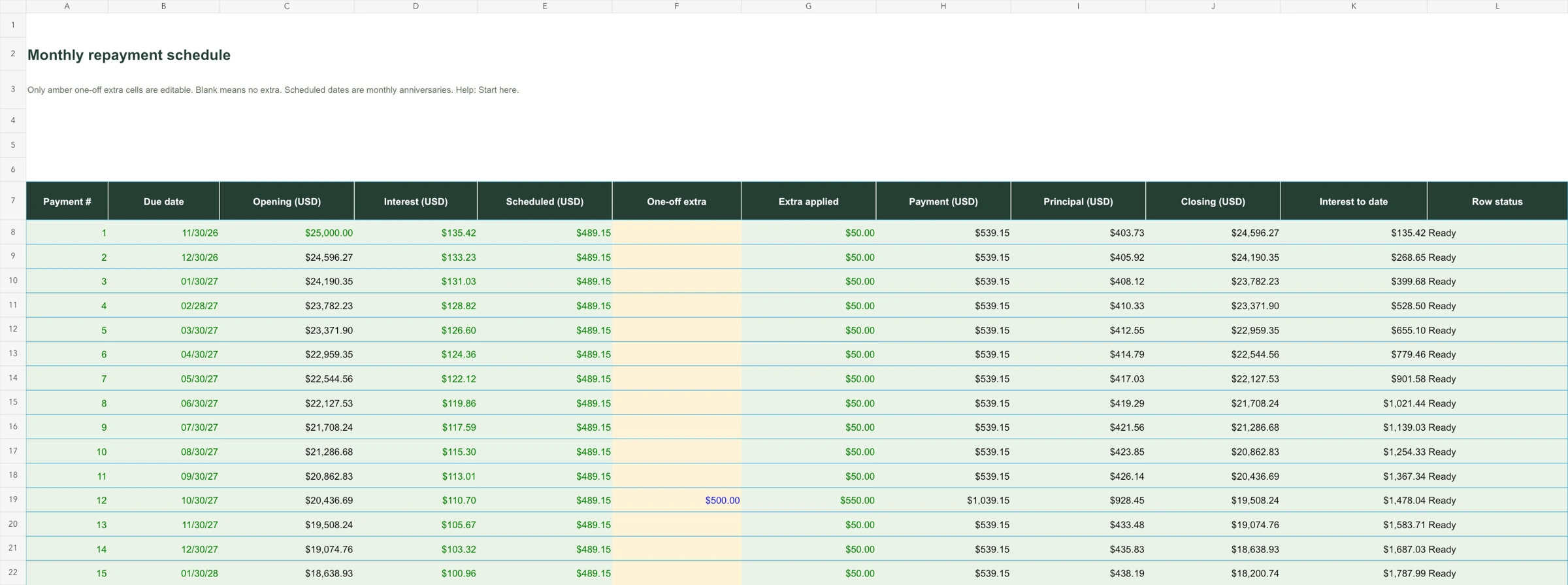 Open the worksheet preview
New to spreadsheets?
Use File > Save As in Excel. Keep the original workbook for next time.
Click a tab at the bottom to open it. B7 means column B, row 7.
Click an amber cell, type, and press Enter. Press Tab to move right.
Use the arrow on a validated cell to choose one of the listed options.
Use real dates and numeric amounts. Enter 50% for half. Keep the existing formats.
Use Ctrl+Z on Windows or Command+Z on Mac. Keep formulas, which start with =.
Keep this beside your workbook
Set loan inputs and review scheduled payment, total interest, payoff timing, and annual principal and interest.
| Field and cells | What to do |
|---|---|
| Principal (B7) | Positive opening balance in USD, up to $1 billion. |
| Annual rate (B8) | Nominal fixed annual rate, 0% to 100%. Monthly rate is annual rate divided by 12. |
| Term in months (B9) | Whole number from 1 to 360. |
| First payment date (B10) | First monthly payment due date. Later dates use monthly anniversaries. |
| Recurring extra (B11) | Extra principal each payment; enter 0 for none. |
| Scheduled payment (G7) | Rounded monthly payment excluding recurring extra. |
Inspect each payment and enter optional one-off extra principal in column F.
| Field and cells | What to do |
|---|---|
| Payment date (B8) | Monthly anniversary of the first payment date. |
| Opening balance (C8) | Prior closing balance; first row uses Loan principal. |
| Interest (D8) | Opening balance × annual rate ÷ 12, rounded to cents. |
| Scheduled payment (E8) | Regular payment capped at amount owed; the final contractual period clears remaining principal. |
| One-off extra (F8) | Optional nonnegative extra principal for this payment. |
| Extra applied (G8) | Recurring plus one-off extra, capped at remaining principal after the scheduled payment. |
| Closing balance (J8) | Opening balance minus principal paid. No negative balance. |
Make it part of your routine
All populated records are fictional. Replace or clear amber examples before using totals.
One fixed-rate USD loan, monthly payments at period end, up to 360 months. No daily accrual, variable rates, fees, escrow, taxes, missed-payment ledger, or lender-specific conventions. Extra payments occur on due dates.
Leave unknown values blank. Enter 0 for a confirmed zero. Read missing-input messages before using a result.
Beyond prepared capacity, extend formulas, validation, summary ranges, and chart ranges together.