Save your own copy
Use File > Save As in Excel. Keep the original workbook for next time.
Your getting-started guide
Coordinate service and repair jobs from a shared register. Link labor and material charges to each job, track internal cost and customer payments, and print a selected customer-facing work order without sharing internal cost records.
Your first five minutes
Set the organization in B4 and review date in B5. Replace examples in A8:K37 and S8:S37. Tax rates are your own inputs; enter 0% when none applies.
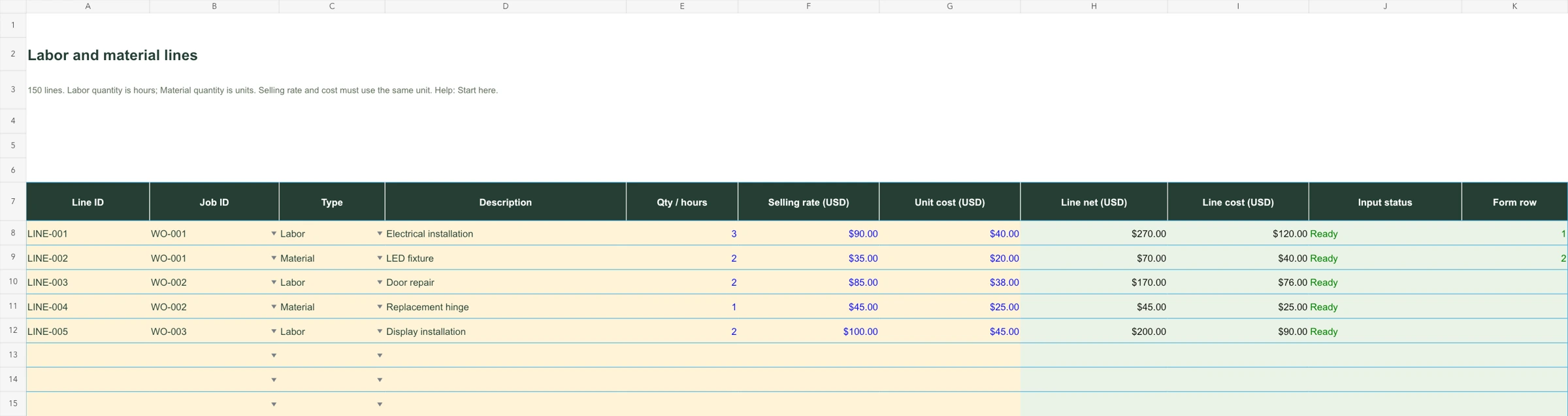
See the fields in JobsEnter unique line IDs and matching job IDs in rows 8–157. Labor quantities are hours; material quantities are units. Selling rate and internal cost use that same unit.
See the fields in Job linesSelect a job in B5 and page in B6. Print each page up to B7. Record status changes, completion dates, and cumulative payments in Jobs; editing the form does not update them.
See the fields in Work orderAmber: your entries. Type your information here.
Green: calculated results. Keep these formulas.
Status colors can change as you work. Use the field instructions below to confirm what you can edit.
Follow along in your copy
The workbook already contains illustrative records so you can see how it works. Find these cells, make a small change following the first steps, and review the result before entering your own information.
These are sample values. Replace or clear the amber example cells before relying on your totals.
 Open the worksheet preview
New to spreadsheets?
Use File > Save As in Excel. Keep the original workbook for next time.
Click a tab at the bottom to open it. B7 means column B, row 7.
Click an amber cell, type, and press Enter. Press Tab to move right.
Use the arrow on a validated cell to choose one of the listed options.
Use real dates and numeric amounts. Enter 50% for half. Keep the existing formats.
Use Ctrl+Z on Windows or Command+Z on Mac. Keep formulas, which start with =.
Keep this beside your workbook
Select a job and page to print a customer-facing form; internal cost and profit are excluded.
| Field and cells | What to do |
|---|---|
| Selected job (B5) | Choose one unique job ID. |
| Page number (B6) | Select a whole page from 1 to the count in B7. Each page shows 10 matching lines. |
| Total incl. tax (G13) | Discounted labor and materials plus their separately rounded taxes. |
| Balance (G14) | Total incl. tax minus cumulative recorded payments. A negative amount is a customer credit. |
Maintain 30 jobs, customer/site details, dates, assignments, status, rates, decisions, and payments.
| Field and cells | What to do |
|---|---|
| Organization (B4) | Business name printed on the form. |
| Review date (B5) | Fixed date for overdue and completion-date checks. |
| Job ID (A8) | Unique stable service-job reference. |
| Customer (B8) | Customer name. |
| Site / scope (C8) | Service location and a concise description of the job. |
| Requested (D8) | Real request date. |
| Due (E8) | Promised date, on or after request. |
| Assigned to (F8) | Responsible technician or team. |
| Status (G8) | Open, In progress, Completed, or Cancelled. |
| Labor tax (H8) | Your applicable tax rate for labor; the example is fictional. |
| Material tax (I8) | Your applicable tax rate for materials. |
| Discount (J8) | Percentage applied to both labor and material subtotals before tax. |
| Paid to date (K8) | Cumulative actual customer payments in USD. |
| Completed on (S8) | Required for Completed; on or after request and no later than review date. |
Record 150 labor or material lines with quantities, selling rates, and internal unit costs.
| Field and cells | What to do |
|---|---|
| Line ID (A8) | Unique stable line reference. |
| Job ID (B8) | Must match exactly one job. |
| Type (C8) | Labor or Material. |
| Description (D8) | Customer-facing work or item description. |
| Quantity (E8) | Nonnegative hours for Labor or units for Material. |
| Selling rate (F8) | USD per matching hour or unit before discount and tax. |
| Internal unit cost (G8) | Actual or estimated internal USD cost in the same units; enter 0 for none. |
Make it part of your routine
All populated records are fictional. Replace or clear amber examples before using totals.
30 jobs and 150 lines. USD. Manual status, cost, and payment entry; no dispatch app, notifications, signatures, automatic invoicing, payment execution, or tax-rule engine. Print one selected 10-line page at a time.
Leave unknown values blank. Enter 0 for a confirmed zero. Read missing-input messages before using a result.
Beyond prepared capacity, extend formulas, validation, summary ranges, and chart ranges together.