A clearer way to work
Keep service work and its costs together.
Coordinate service and repair jobs from a shared register. Link labor and material charges to each job, track internal cost and customer payments, and print a selected customer-facing work order without sharing internal cost records.
Small service, repair, maintenance, and field-work teams managing jobs manually.
30-job register and 150 cost lines
Labor and material pricing, tax, and discounts
Gross profit, partial payments, and due-date flags
Printable work order with 10 lines per selected page
One connected workbook
Take a look inside.
Start with the included guide, replace the example inputs, and review the calculated results.
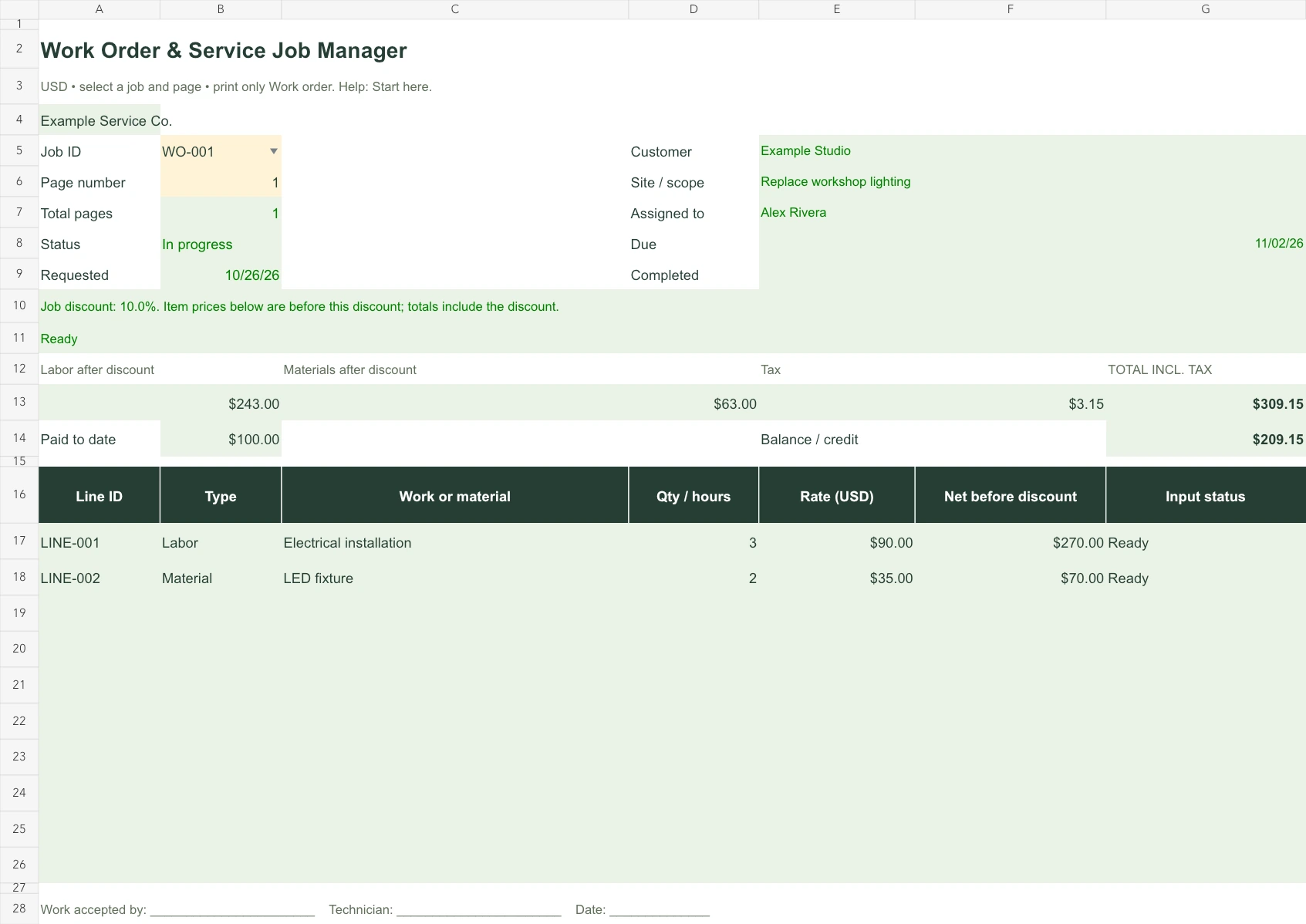
Work order
Select a job and page to print a customer-facing form; internal cost and profit are excluded.
Jobs
Maintain 30 jobs, customer/site details, dates, assignments, status, rates, decisions, and payments.
Job lines
Record 150 labor or material lines with quantities, selling rates, and internal unit costs.
 Explore the details
From download to your daily work
A useful start in three steps.
- 01
Jobs: Set the organization in B4 and review date in B5. Replace examples in A8:K37 and S8:S37. Tax rates are your own inputs; enter 0% when none applies.
- 02
Job lines: Enter unique line IDs and matching job IDs in rows 8–157. Labor quantities are hours; material quantities are units. Selling rate and internal cost use that same unit.
- 03
Work order: Select a job in B5 and page in B6. Print each page up to B7. Record status changes, completion dates, and cumulative payments in Jobs; editing the form does not update them.
The useful details
Before you make it yours.
Does gross profit include tax, and are internal costs printed?
Gross profit is discounted labor and material revenue excluding tax, less the entered internal line costs. It is not net profit and includes only recorded costs. The customer form shows selling prices, the job discount, tax, payments, and balance; internal costs and profit stay in Jobs and Job lines. Negative balances show overpayments as credits.
What will I receive after purchase?
You receive the complete Work Order & Service Job Manager as an editable .xlsx file with 3 worksheets, sample data, and live formulas. Your paid order confirmation includes download links. Sign in to your GridMori account to keep purchased workbooks together in your library.
Do I need a subscription?
No. This workbook is a one-time $9 purchase. Choose any 3 different GridMori templates for $24 or any 5 for $32. Your bag applies $8-each pricing for 3–4 templates and $6.40-each pricing for 5 or more. Taxes are calculated at checkout.
Which spreadsheet app is it designed for?
Editable .xlsx for modern Microsoft Excel on Windows or Mac. No VBA macros. Other spreadsheet apps require import and review of formulas, charts, dropdowns, and layout.
Can I customize the workbook for my business?
Yes. Replace the example data, edit the input fields, and adapt the labels and appearance for your own work. Keep an original copy and check formulas and chart ranges when extending the prepared structure. A personal commercial-use license is included; it does not permit resale of the template.