A clearer way to work
See which dependencies determine the finish.
Build an ordered dependency plan, estimate task durations, and calculate the path that controls project completion. Early and late workday offsets expose float; a linked Gantt translates those results into dates.
Project leads planning small finish-to-start dependency networks in Excel.
30 tasks with three predecessors each
Optimistic / likely / pessimistic estimates
Forward and backward passes with total float
Mon–Fri dates and 20-period Gantt
One connected workbook
Take a look inside.
Start with the included guide, replace the example inputs, and review the calculated results.
Plan
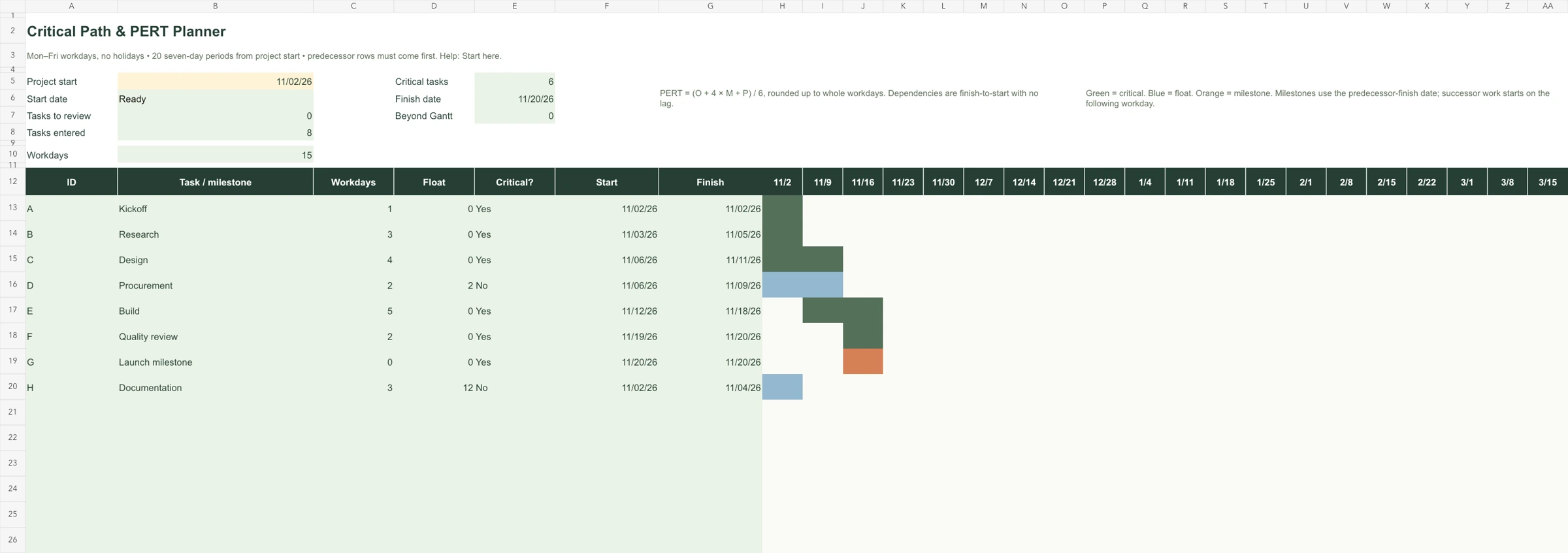
Set project start, review duration and critical-task counts, and inspect the 20-period Gantt.
Tasks
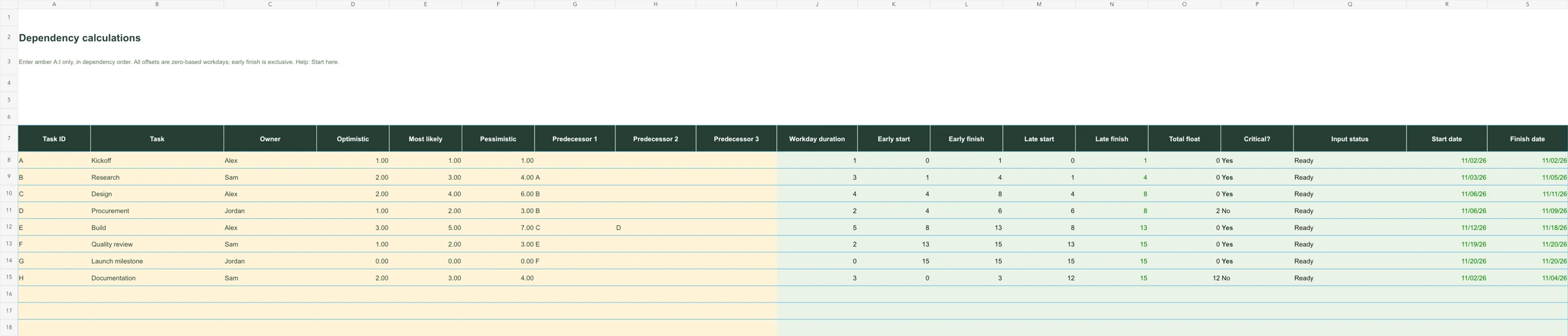
Enter tasks in dependency order with three-point estimates; inspect early/late offsets, float, and dates.
 Explore the details
From download to your daily work
A useful start in three steps.
- 01
Plan: Set the project start date in B5 to a Monday–Friday date. Dates use a five-day workweek without holidays.
- 02
Tasks: Replace task inputs in A8:I37. Keep predecessors above their successors; enter each predecessor’s exact ID in G:I. Blank predecessor fields mean no dependency.
- 03
Plan: Resolve every task warning before using the critical path. Change estimates or dependencies to test the schedule. Green bars are critical, blue bars have float, and orange marks zero-duration milestones.
The useful details
Before you make it yours.
How are duration, milestones, and dependency order handled?
The PERT weighted mean (optimistic + 4 × likely + pessimistic) / 6 rounds upward to whole workdays. Predecessors must appear above successors, preventing circular networks. Durations and float use zero-based workday offsets. A zero-duration milestone is dated on its predecessor-finish workday (or project start when independent); its successors begin on the next workday. PERT estimates do not produce a project completion probability.
What will I receive after purchase?
You receive the complete Critical Path & PERT Planner as an editable .xlsx file with 2 worksheets, sample data, and live formulas. Your paid order confirmation includes download links. Sign in to your GridMori account to keep purchased workbooks together in your library.
Do I need a subscription?
No. This workbook is a one-time $9 purchase. Choose any 3 different GridMori templates for $24 or any 5 for $32. Your bag applies $8-each pricing for 3–4 templates and $6.40-each pricing for 5 or more. Taxes are calculated at checkout.
Which spreadsheet app is it designed for?
Editable .xlsx for modern Microsoft Excel on Windows or Mac. No VBA macros. Other spreadsheet apps require import and review of formulas, charts, dropdowns, and layout.
Can I customize the workbook for my business?
Yes. Replace the example data, edit the input fields, and adapt the labels and appearance for your own work. Keep an original copy and check formulas and chart ranges when extending the prepared structure. A personal commercial-use license is included; it does not permit resale of the template.