Save your own copy
Use File > Save As in Excel. Keep the original workbook for next time.
Your getting-started guide
Build an ordered dependency plan, estimate task durations, and calculate the path that controls project completion. Early and late workday offsets expose float; a linked Gantt translates those results into dates.
Your first five minutes
Set the project start date in B5 to a Monday–Friday date. Dates use a five-day workweek without holidays.
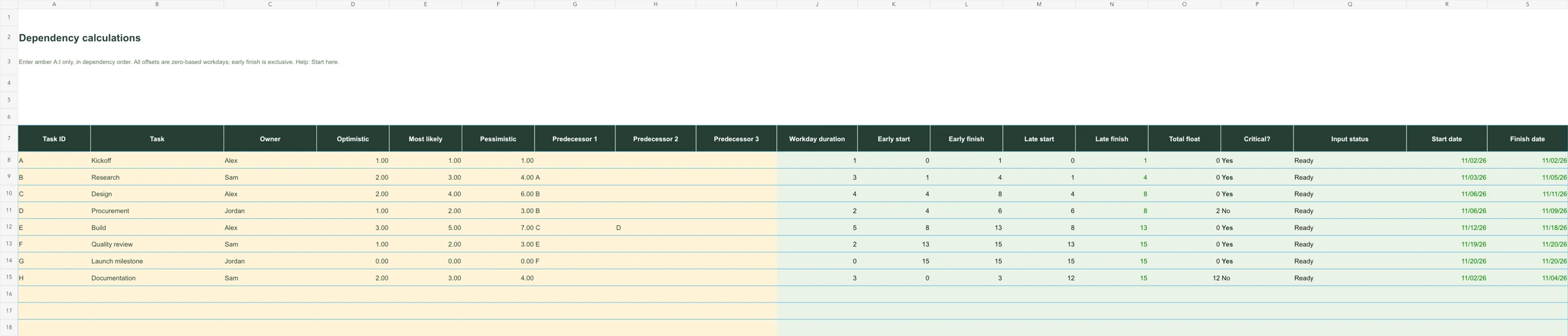
See the fields in PlanReplace task inputs in A8:I37. Keep predecessors above their successors; enter each predecessor’s exact ID in G:I. Blank predecessor fields mean no dependency.
See the fields in TasksResolve every task warning before using the critical path. Change estimates or dependencies to test the schedule. Green bars are critical, blue bars have float, and orange marks zero-duration milestones.
See the fields in PlanAmber: your entries. Type your information here.
Green: calculated results. Keep these formulas.
Status colors can change as you work. Use the field instructions below to confirm what you can edit.
Follow along in your copy
The workbook already contains illustrative records so you can see how it works. Find these cells, make a small change following the first steps, and review the result before entering your own information.
These are sample values. Replace or clear the amber example cells before relying on your totals.
 Open the worksheet preview
New to spreadsheets?
Use File > Save As in Excel. Keep the original workbook for next time.
Click a tab at the bottom to open it. B7 means column B, row 7.
Click an amber cell, type, and press Enter. Press Tab to move right.
Use the arrow on a validated cell to choose one of the listed options.
Use real dates and numeric amounts. Enter 50% for half. Keep the existing formats.
Use Ctrl+Z on Windows or Command+Z on Mac. Keep formulas, which start with =.
Keep this beside your workbook
Set project start, review duration and critical-task counts, and inspect the 20-period Gantt.
| Field and cells | What to do |
|---|---|
| Project start (B5) | Real Monday–Friday start date. All task dates derive from it. |
| Tasks needing review (B7) | Any entered task that fails input or predecessor checks. |
| Project workdays (B10) | Maximum early-finish offset after a valid forward pass. |
| Critical tasks (E5) | Tasks with zero total float, including zero-duration critical milestones. |
Enter tasks in dependency order with three-point estimates; inspect early/late offsets, float, and dates.
| Field and cells | What to do |
|---|---|
| Task ID (A8) | Unique stable identifier. Use text IDs to avoid leading-zero ambiguity. |
| Task (B8) | Name of the task or milestone. |
| Owner (C8) | Person responsible. |
| Optimistic days (D8) | Nonnegative workdays; no larger than most likely. |
| Most likely days (E8) | Between optimistic and pessimistic. |
| Pessimistic days (F8) | No smaller than most likely. |
| Predecessor 1 (G8) | Exact ID of a task above this row; leave blank for no predecessor. |
| Predecessor 2 (H8) | Optional second distinct predecessor above this row. |
| Predecessor 3 (I8) | Optional third distinct predecessor above this row. |
| Scheduled duration (J8) | ROUNDUP((optimistic + 4 × most likely + pessimistic) / 6, 0). All zero estimates create a milestone. |
| Early start / finish (K8) | Zero-based workday offsets from the forward pass; finish is exclusive. |
| Late start / finish (M8) | Backward-pass offsets using the latest project finish. |
| Total float (O8) | Late start minus early start. Zero means critical. |
Make it part of your routine
All populated records are fictional. Replace or clear amber examples before using totals.
30 tasks, three predecessors per task, finish-to-start links, and Mon–Fri workdays with no holidays. Predecessors must be above successors; self-links, forward links, and cycles are rejected. No lags, resource leveling, imposed deadlines, or probabilistic completion forecast. Gantt shows 20 seven-day periods.
Leave unknown values blank. Enter 0 for a confirmed zero. Read missing-input messages before using a result.
Beyond prepared capacity, extend formulas, validation, summary ranges, and chart ranges together.