See the formula-linked organization chart and department headcount.
People / The GridMori collection
Excel .xlsx · 2 worksheets
Org Chart Excel Template with Employee Directory
For founders and small-team managers: maintain a people directory and fill a prepared organization chart from linked names and roles. $9 USD once, before tax. Two working sheets plus Start here for modern Microsoft Excel on Windows or Mac.
Excel .xlsx download after payment. Tax calculated at checkout.
Editable formulasSample data includedNo macros
See the workbook at work
Replace a person in a prepared chart position
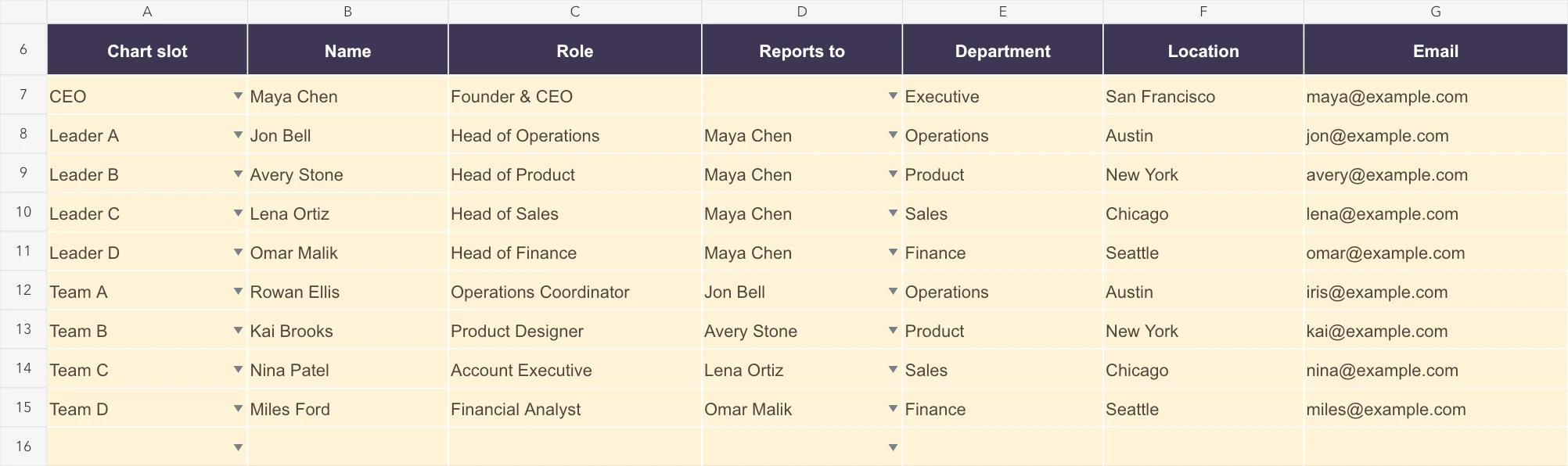
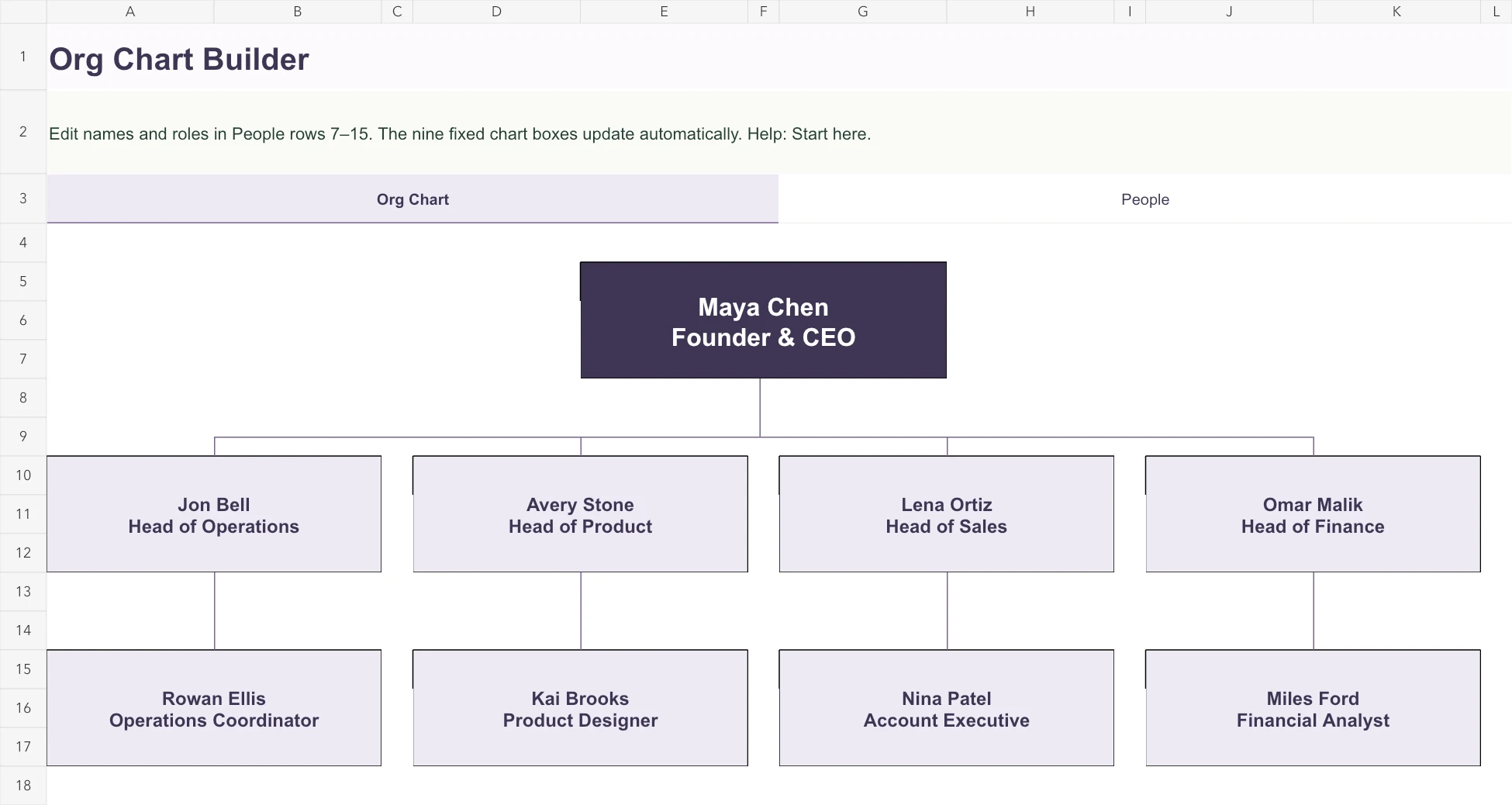
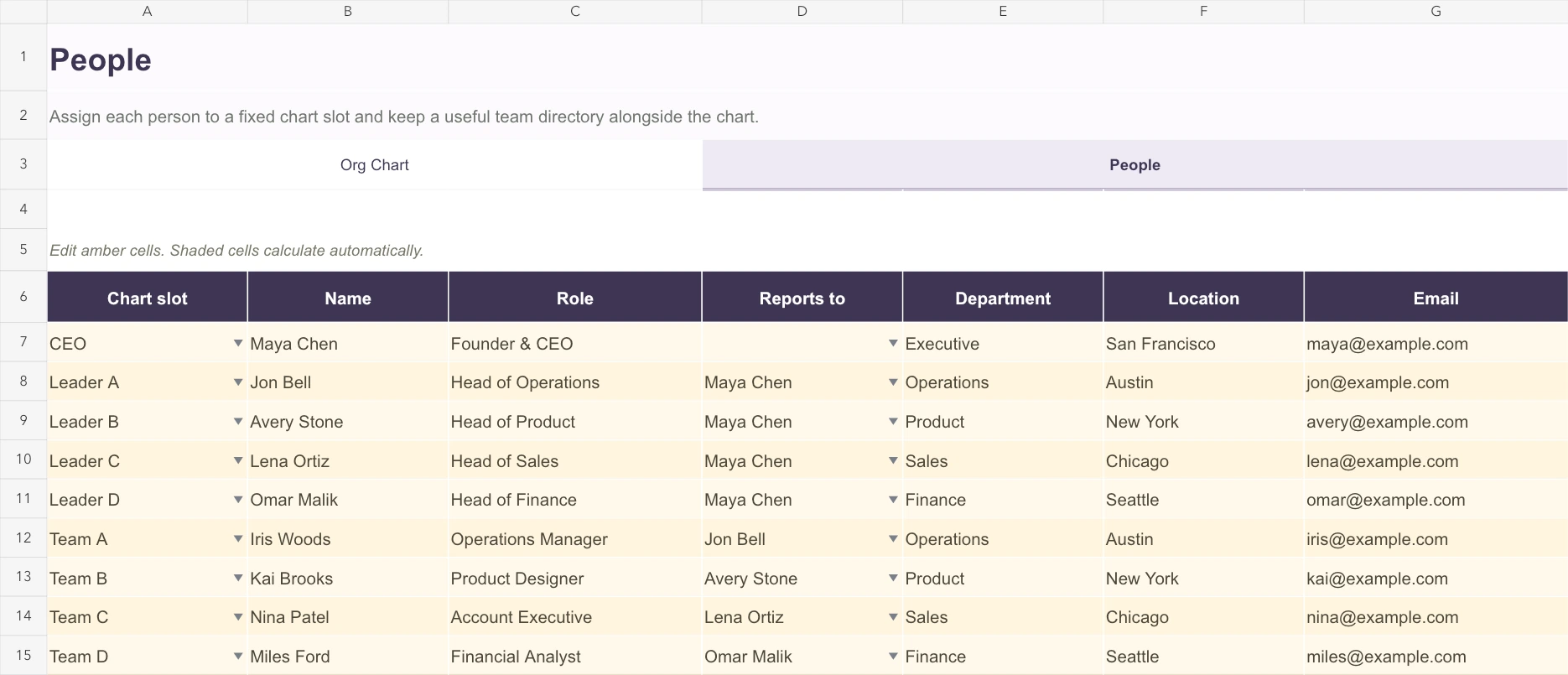
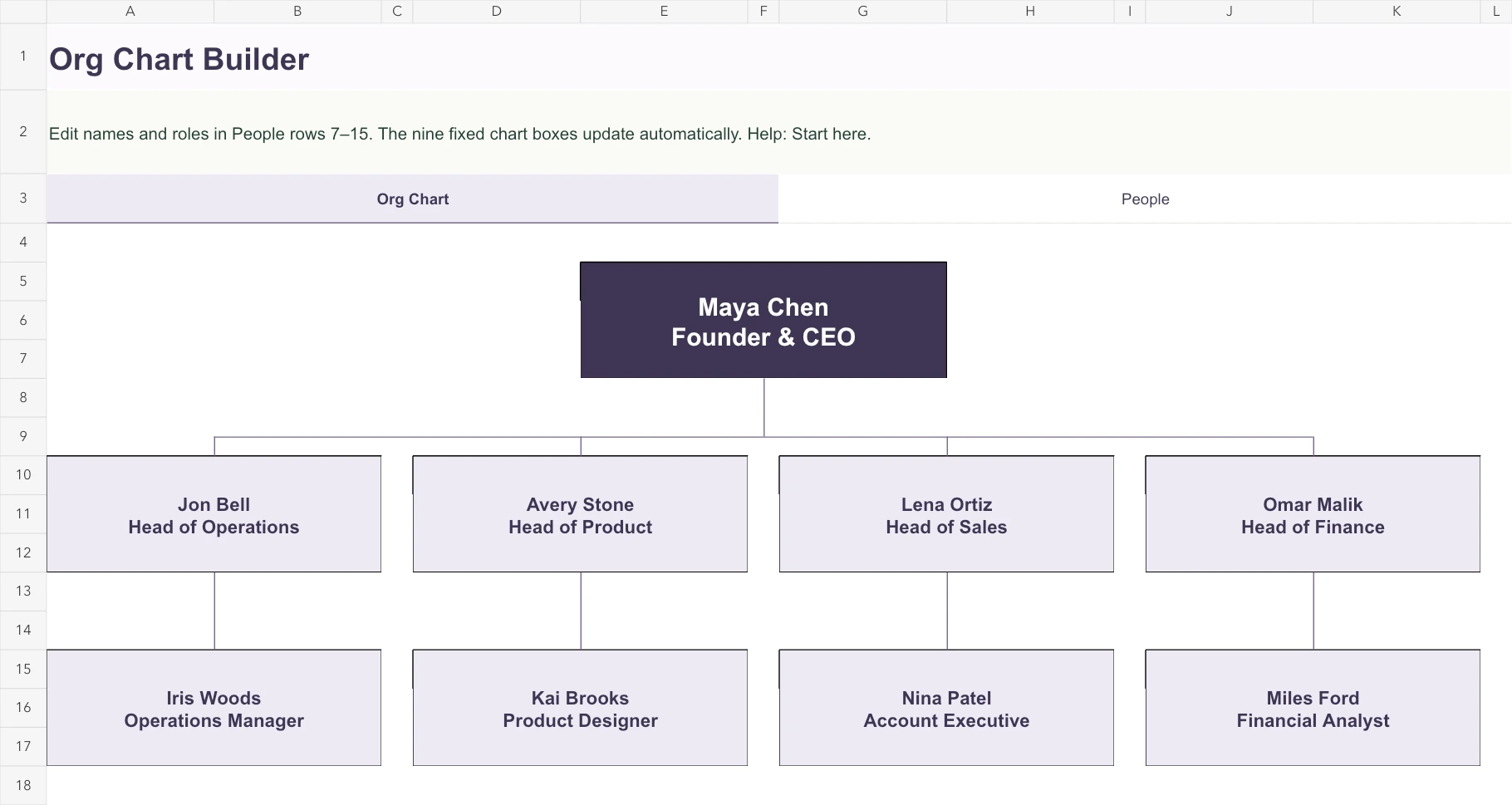
Changing People!B12:C12 from Iris Woods / Operations Manager to Rowan Ellis / Operations Coordinator updates the lower-left chart box to the new name and role.
Fictional example using the shipped Excel workbook. Worksheet captures show the example inputs and results; follow-along changes are described below.
01
Review the directory-to-chart mapping
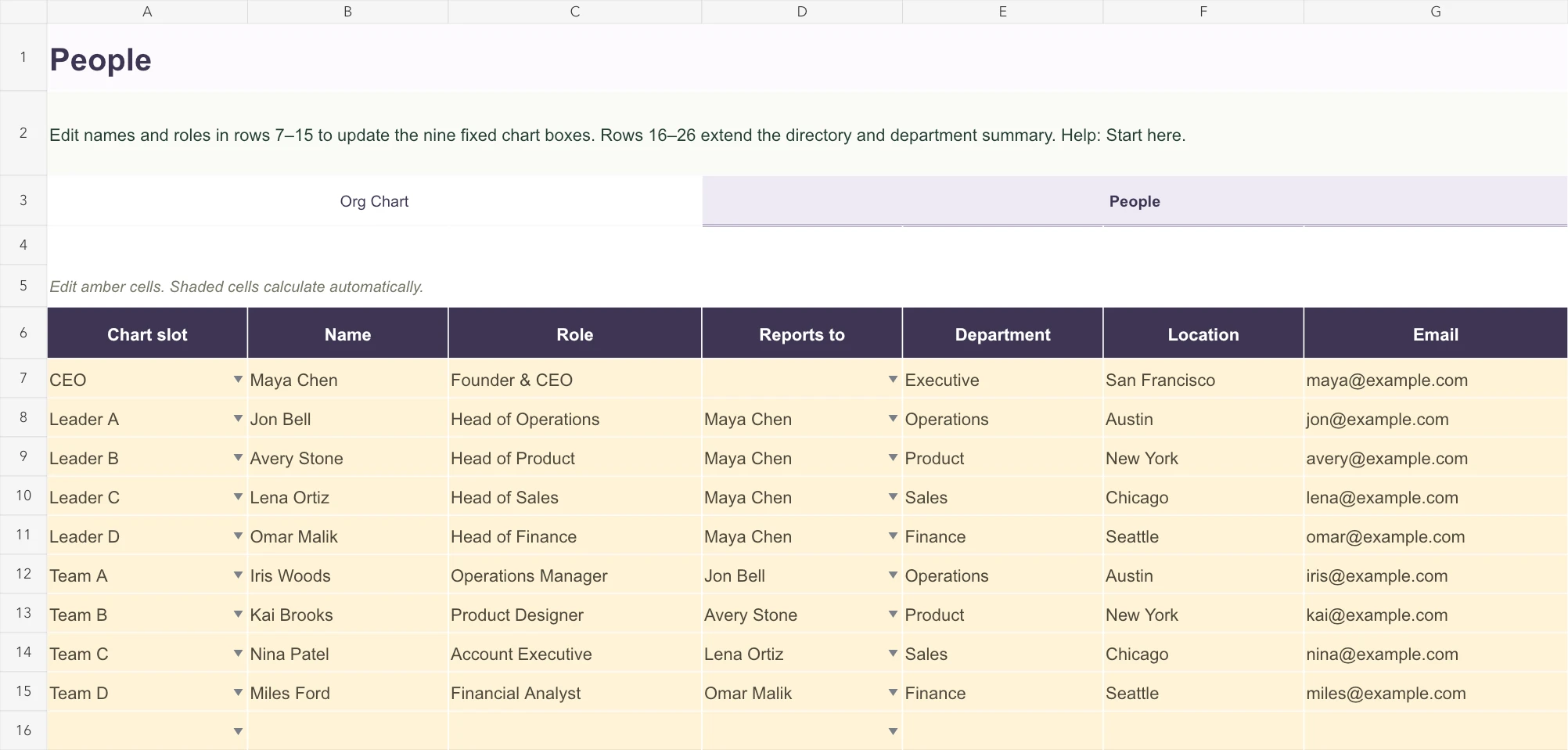
The fictional directory has a CEO, four leaders, and four team members.
People rows 7–15 feed the nine chart boxes. Row 12 feeds the lower-left team box, regardless of changes to the text in Chart slot or Reports to.
A static chart can be enough when the team structure rarely changes.
What this $9 workbook adds
Choose this workbook when a nine-position layout fits your team and you want linked names and roles, a reusable directory, and department headcounts. Use a diagram tool when you need automatic rearrangement.
Prepared capacity
20 prepared people-directory rows (7–26).
Nine fixed chart boxes: one CEO, four leaders, and four team positions, linked to directory rows 7–15.
Two working sheets plus Start here.
Supported behavior and limits
Chart boxes read fixed directory rows. Editing Chart slot or Reports to labels does not move boxes or redraw connectors.
Additional directory rows contribute to prepared department counts but do not create new chart boxes. Extend chart formulas and layout manually for a larger structure.
No automatic hierarchy layout, photos, HR-system sync, or drag-and-drop diagram editing. Review print preview before exporting.
Prepared capacity describes the supplied ranges. Extending them requires reviewing formulas, dropdowns, summaries, and print layout.
Org Chart Builder at a glance
Price
$9 USD, one time, before tax.
Intended user
Founders, team managers, and people teams documenting an organization.
Compatibility
Editable .xlsx for modern Microsoft Excel on Windows or Mac. No VBA macros. Other spreadsheet apps require import and review of formulas, charts, dropdowns, and layout.
Capabilities
Formula-linked org chart; People directory; Department summary; Print-ready layout.
Limitations
Chart boxes read fixed directory rows. Editing Chart slot or Reports to labels does not move boxes or redraw connectors. Additional directory rows contribute to prepared department counts but do not create new chart boxes. Extend chart formulas and layout manually for a larger structure. No automatic hierarchy layout, photos, HR-system sync, or drag-and-drop diagram editing. Review print preview before exporting.
Purchase terms
USD, one-time payment. No subscription. Choose any 3 different templates for $24 or any 5 for $32. One or two templates cost $9 each; 3–4 cost $8 each; 5 or more cost $6.40 each. Mix any categories; the discount applies automatically to every workbook in the bag. Extra copies of the same template do not unlock a tier. Taxes are calculated at checkout. Download after successful payment, with account purchase history when signed in. Personal commercial use in your own business is included. Resale and redistribution of the template files are not permitted.
A clear organization chart starts with a useful people directory. Keep names, reporting relationships, and departments together, then use the linked chart to explain how the team fits together. It is a practical companion for onboarding, planning, and team introductions.
Made for
Founders, team managers, and people teams documenting an organization.
01
Formula-linked org chart
02
People directory
03
Department summary
04
Print-ready layout
One connected workbook
Take a look inside.
Start with the included guide, replace the example inputs, and review the calculated results.
01
Org Chart
See the formula-linked organization chart and department headcount.
02
People
Edit the people directory that supplies the chart's names and relationships.
Yes. The workbook includes a chart layout for printing. Review the displayed names and reporting relationships, then check Excel's print preview and page settings before printing or exporting to PDF.
What will I receive after purchase?+
You receive the complete Org Chart Builder as an editable .xlsx file with 2 worksheets, sample data, and live formulas. Your paid order confirmation includes download links. Sign in to your GridMori account to keep purchased workbooks together in your library.
Do I need a subscription?+
No. This workbook is a one-time $9 purchase. Choose any 3 different GridMori templates for $24 or any 5 for $32. Your bag applies $8-each pricing for 3–4 templates and $6.40-each pricing for 5 or more. Taxes are calculated at checkout.
Which spreadsheet app is it designed for?+
Editable .xlsx for modern Microsoft Excel on Windows or Mac. No VBA macros. Other spreadsheet apps require import and review of formulas, charts, dropdowns, and layout.
Can I customize the workbook for my business?+
Yes. Replace the example data, edit the input fields, and adapt the labels and appearance for your own work. Keep an original copy and check formulas and chart ranges when extending the prepared structure. A personal commercial-use license is included; it does not permit resale of the template.
Before you buy
Your file, license, and download help
Purchase
$9 USD once, before tax. An editable Excel .xlsx file after successful payment. No subscription. Mix any three different templates for $24 or five for $32.
License
Use and customize the workbook in your own business. Resale and redistribution of the template file are not permitted.
Download help
Keep your private order-confirmation link. If an automatic download is blocked, use its manual download button. Signed-in buyers can also reopen their purchase library. Keep receipt links private.
Workbook help
Use the included Start here sheet or the public workbook guide. Save an original copy before replacing sample data.
Payment support
For receipts marked “Sold through Link,” use Link’s purchase support for payment questions. Guest buyers can also contact Link support without creating an account. Keep your receipt available. Open Link purchase support.
Refund requests
For orders marked “Sold through Link,” request a refund through Link support. Its policy covers certain delivery, product, and payment problems reported within 60 days. Eligibility and local consumer rights apply. This is not an unconditional money-back guarantee. Read eligibility and request a refund.
 Open full-size worksheet