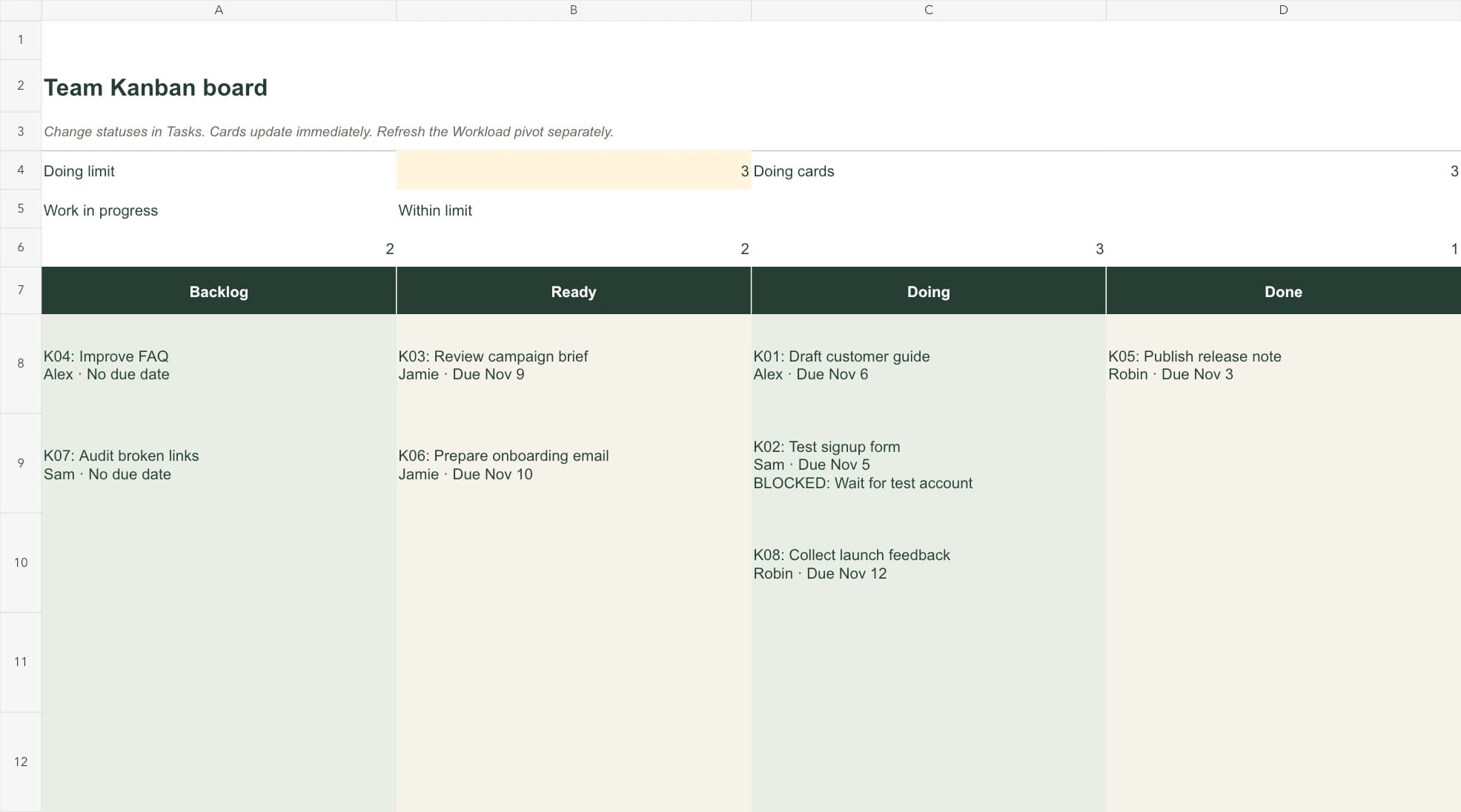
A Kanban board is useful when it changes the team's conversation about finishing work. Four attractive columns are not enough. Each card needs an owner, a next step, and a clear status.
Keep all task records in one register. A formula-based board is a view of those records, so changing a status moves the card without creating competing copies.
Free tutorial for small teams and spreadsheet users. Examples use English-language formulas. Modern Excel is the workbook’s target app; Google Sheets imports require feature checks. Optional templates are separate one-time purchases with their own capabilities, limits, and terms on the linked product page.
01
Agree on four explicit lane definitions
Use Backlog for work that has not been committed, Ready for tasks with enough information to start, Doing for actively worked tasks, and Done for completed outcomes. Put these exact values in a status dropdown.
In the register, include Task ID, Task, Owner, Status, Priority, Due date, Next step, and Blocked. Give each task a stable ID. A blocked task remains in Doing if it has already started; record the blocker and the action needed to remove it.
02
Set and count the Doing limit
Put an editable Doing limit in B2. If Status is D8:D47, count active tasks with COUNTIF. A starting limit of three is a discussion setting for the example, not a universal target. Choose a limit based on how the team actually finishes work.
With three Doing cards and a limit of three, the board is within the limit. Move a Ready task into Doing and the count becomes four. That should trigger an explicit discussion about finishing, unblocking, or deliberately exceeding the limit.
=IF(COUNTIF(D8:D47,"Doing")>$B$2,"Over limit","Within limit")03
Move records rather than copying cards
In the GridMori workbook, edit Status in Tasks. Lane keys and lookup formulas place the task's card in the corresponding Board column. The card shows its source ID, title, owner, due date, and blocker. Cards are not draggable.
If building a board yourself, filter the authoritative register into each lane or use numbered lane keys and INDEX/MATCH. Keep a stable display order. Never manually paste a task into Done while leaving its original record in Doing.
04
Use the review to finish work
Start with blocked Doing cards, then review the oldest unfinished tasks. Give each one a concrete next action. Use the workload pivot to compare counts by owner and status, refreshing it after register edits. A count can reveal concentration but does not measure effort.
Test a task with no due date, a blocked task, and the final prepared row. Confirm that each appears once in the correct lane. This spreadsheet supports a shared review; it does not send reminders or synchronize with a task-management service.
Skip the blank-sheet setup
Team Kanban Board
Four linked lanes, 40 task rows, an editable Doing limit, and an owner-by-status pivot.FAQ
Common questions
Does an over-limit warning prevent adding work?
No. It makes the decision visible. The team can exceed the limit deliberately, then record why and agree how to return below it.
Should blocked cards move back to Ready?
Keep an already-started task visible in Doing unless the team explicitly changes its commitment. Otherwise the WIP count hides unfinished work.