Save your own copy
Use File > Save As in Excel. Keep the original workbook for next time.
Your getting-started guide
Build a single-level bill of materials from reusable part prices. Enter a batch quantity, include a scrap allowance, and compare material, labor, overhead, and total batch cost before starting production.
Your first five minutes
Replace examples in A8:F107. Each part needs a unique code, unit cost, and Whole or Fractional issue policy.
See the fields in PartsSet the assembly and revision in B4:B5, costing date in B6, batch quantity in B7, and per-unit labor/overhead in B8:B9. Replace component inputs in rows 14–63.
See the fields in AssemblySave a dated workbook copy before changing prices or design. Record the revision and reason in the manual history, then review cost and input warnings.
See the fields in RevisionsAmber: your entries. Type your information here.
Green: calculated results. Keep these formulas.
Status colors can change as you work. Use the field instructions below to confirm what you can edit.
Follow along in your copy
The workbook already contains illustrative records so you can see how it works. Find these cells, make a small change following the first steps, and review the result before entering your own information.
These are sample values. Replace or clear the amber example cells before relying on your totals.
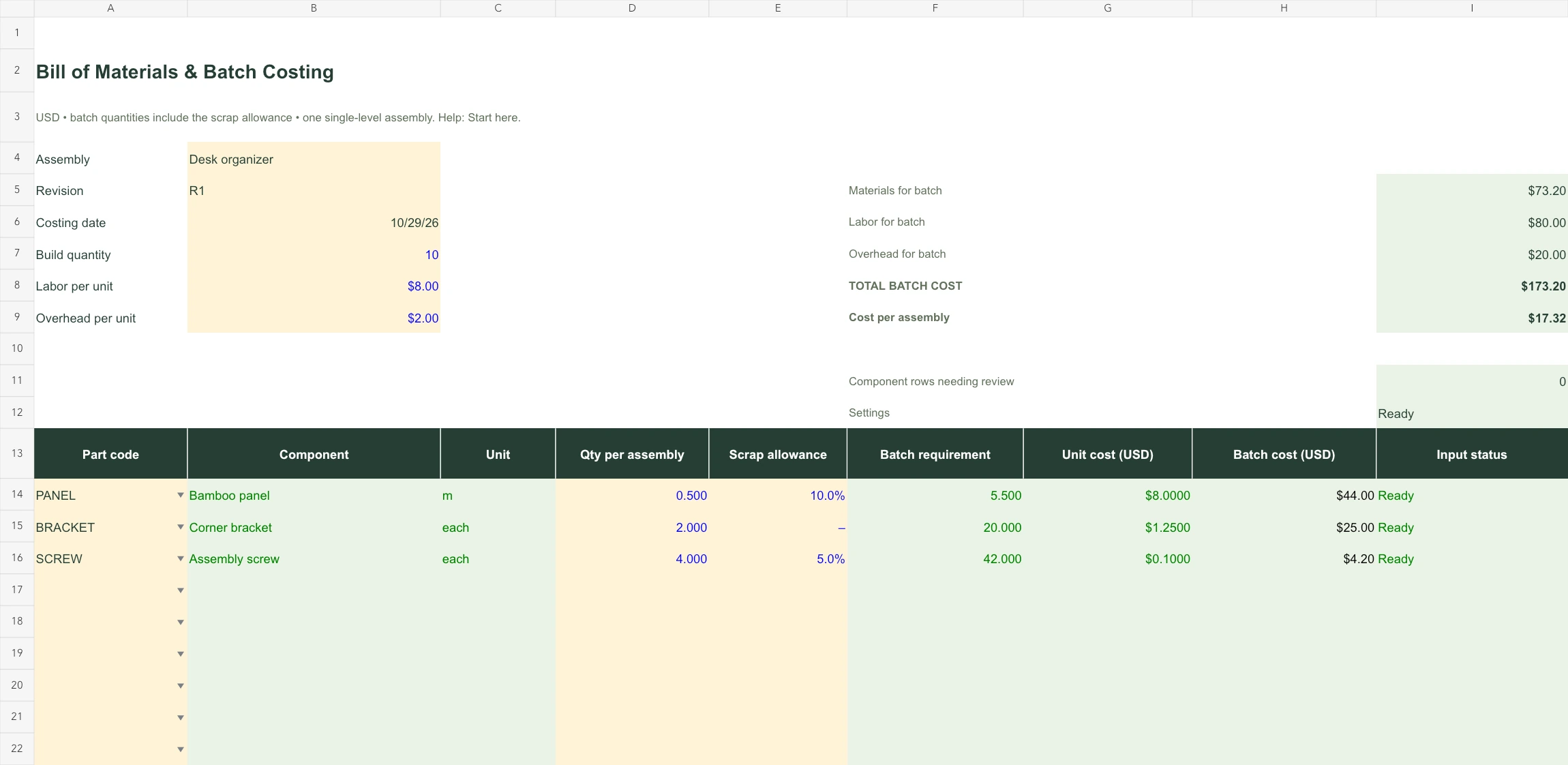 Open the worksheet preview
New to spreadsheets?
Use File > Save As in Excel. Keep the original workbook for next time.
Click a tab at the bottom to open it. B7 means column B, row 7.
Click an amber cell, type, and press Enter. Press Tab to move right.
Use the arrow on a validated cell to choose one of the listed options.
Use real dates and numeric amounts. Enter 50% for half. Keep the existing formats.
Use Ctrl+Z on Windows or Command+Z on Mac. Keep formulas, which start with =.
Keep this beside your workbook
Set the product revision and batch size; enter component quantities and review batch cost.
| Field and cells | What to do |
|---|---|
| Assembly (B4) | Product or assembly being costed. One assembly per saved workbook. |
| Revision (B5) | Design revision represented by the current component list. |
| Costing date (B6) | Date these prices and assumptions were reviewed. |
| Batch quantity (B7) | Positive whole number of finished assemblies to make. |
| Labor per unit (B8) | USD labor allowance per finished assembly; enter 0 for none. |
| Overhead per unit (B9) | USD overhead allowance per finished assembly; enter 0 for none. |
| Component code (A14) | Choose a unique part code from Parts. Repeated component lines are allowed and sum into cost. |
| Quantity per assembly (D14) | Nominal component requirement before the scrap allowance. |
| Scrap allowance (E14) | Extra quantity as a percentage of nominal quantity, not a yield-loss denominator. |
| Required for batch (F14) | Nominal quantity × (1 + allowance) × batch size. Whole issue policy rounds up after multiplying the batch. |
Maintain 100 unique part codes, descriptions, units, prices, issue policies, and suppliers.
| Field and cells | What to do |
|---|---|
| Part code (A8) | Unique identifier. Duplicate codes flag every matching row. |
| Description (B8) | Name shown in the assembly list. |
| Unit (C8) | Unit in which quantity and price are expressed, such as each, m, or kg. |
| Unit cost (D8) | Nonnegative USD per listed unit; enter 0 for a confirmed free part. |
| Issue policy (E8) | Whole rounds batch requirements up to an integer; Fractional retains decimal quantity. |
| Supplier (F8) | Optional supplier or source reference. |
Record 20 dated revisions manually; this is a history log, not an automatic snapshot archive.
| Field and cells | What to do |
|---|---|
| Revision (A8) | Unique revision reference. |
| Date (B8) | Date of the change. |
| Changed by (C8) | Person responsible for the revision. |
| Reason (D8) | Describe what changed and why. |
Make it part of your routine
All populated records are fictional. Replace or clear amber examples before using totals.
One single-level assembly, 50 component lines, 100 parts, and 20 revision entries. USD. No nested subassembly expansion, live prices, inventory depletion, purchasing automation, or saved-revision snapshots.
Leave unknown values blank. Enter 0 for a confirmed zero. Read missing-input messages before using a result.
Beyond prepared capacity, extend formulas, validation, summary ranges, and chart ranges together.