Prepare a purchase-order form for review, printing, or PDF export.
Operations / The GridMori collection
Excel .xlsx · 4 worksheets
Purchase Order Tracker Excel Template
For office managers and small operations teams: prepare a supplier order, reuse vendor and item details, and track approval, delivery, and payment in one Excel workbook. $9 USD once, before tax. Includes four working sheets and a Start here guide. Designed for modern Microsoft Excel on Windows or Mac.
Excel .xlsx download after payment. Tax calculated at checkout.
Editable formulasSample data includedNo macros
See the workbook at work
An October supply order for Evergreen Supply Co.
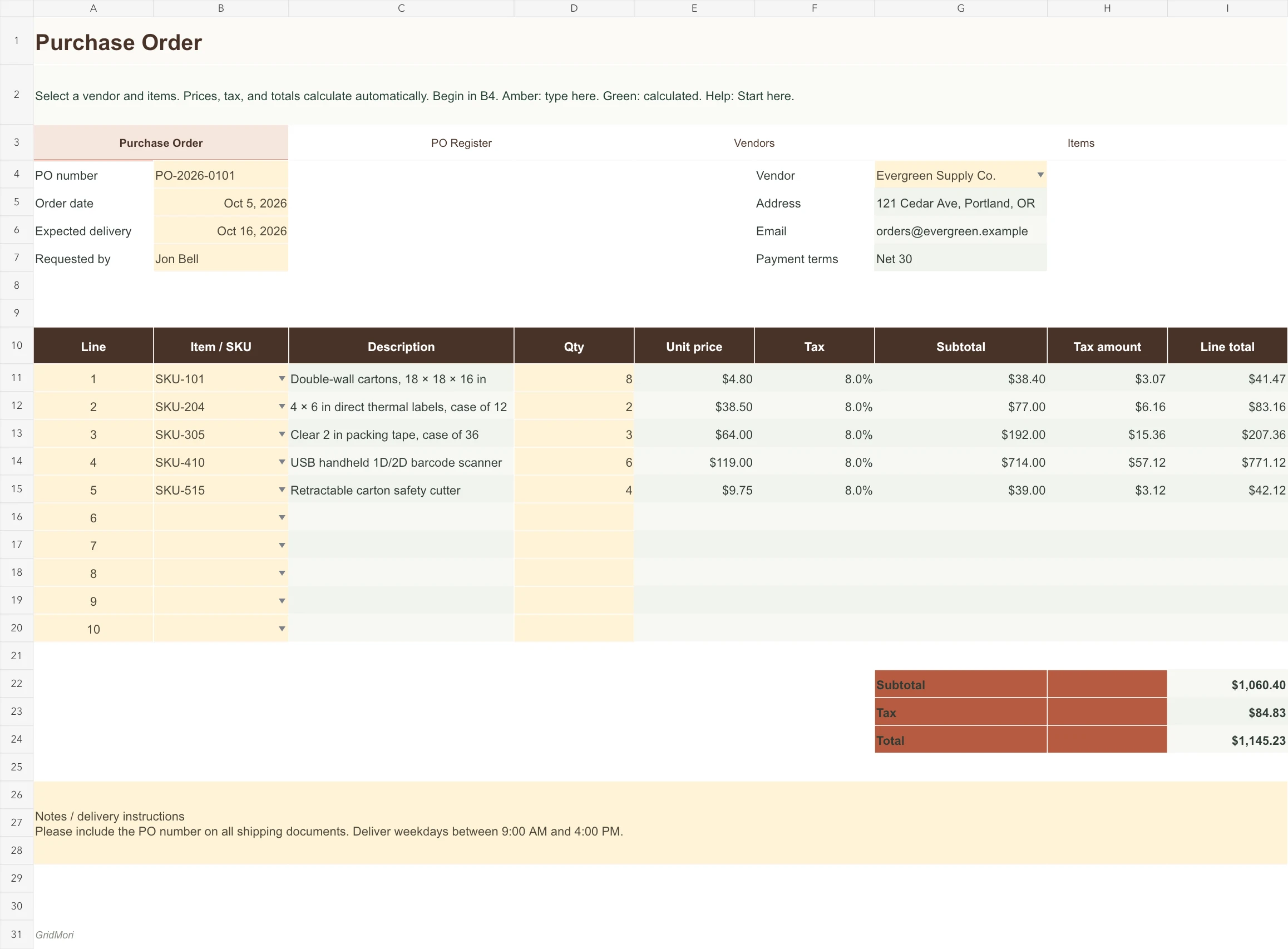
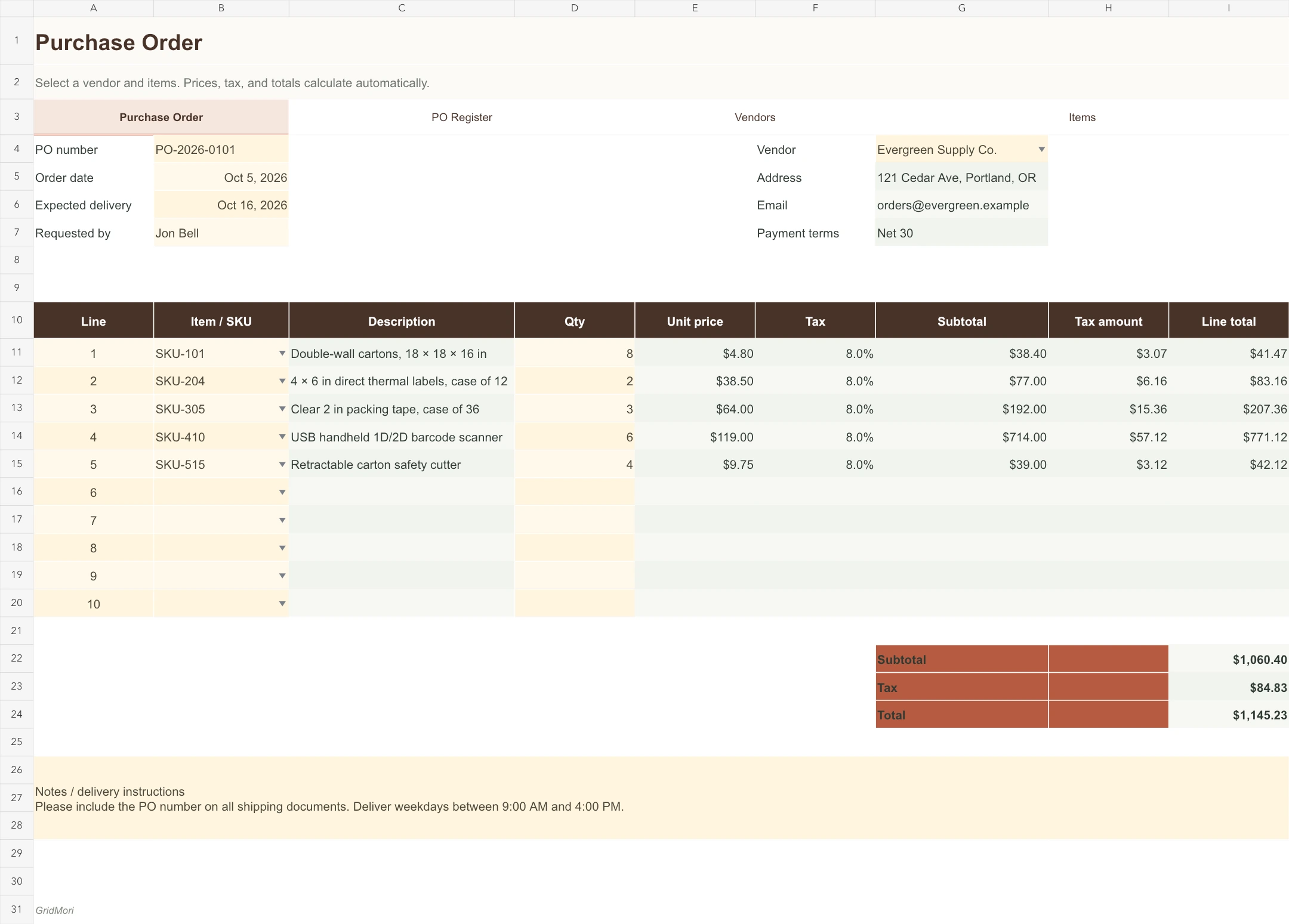
PO-2026-0101 totals $1,145.23: $1,060.40 in goods plus $84.83 example tax. Enter the approved order in the register, then update its delivery and payment status as events occur.
Fictional example using the shipped Excel workbook. Worksheet captures show the example inputs and results; follow-along changes are described below.
Watch the worked example
58 seconds. Live workbook capture in Apple Numbers, sped up with pauses removed. Fictional data; no audio. The downloadable file is an Excel .xlsx workbook. Use full screen to inspect the cells.
On-screen changes and calculated results are described in the English captions and transcript.
Read the video transcript
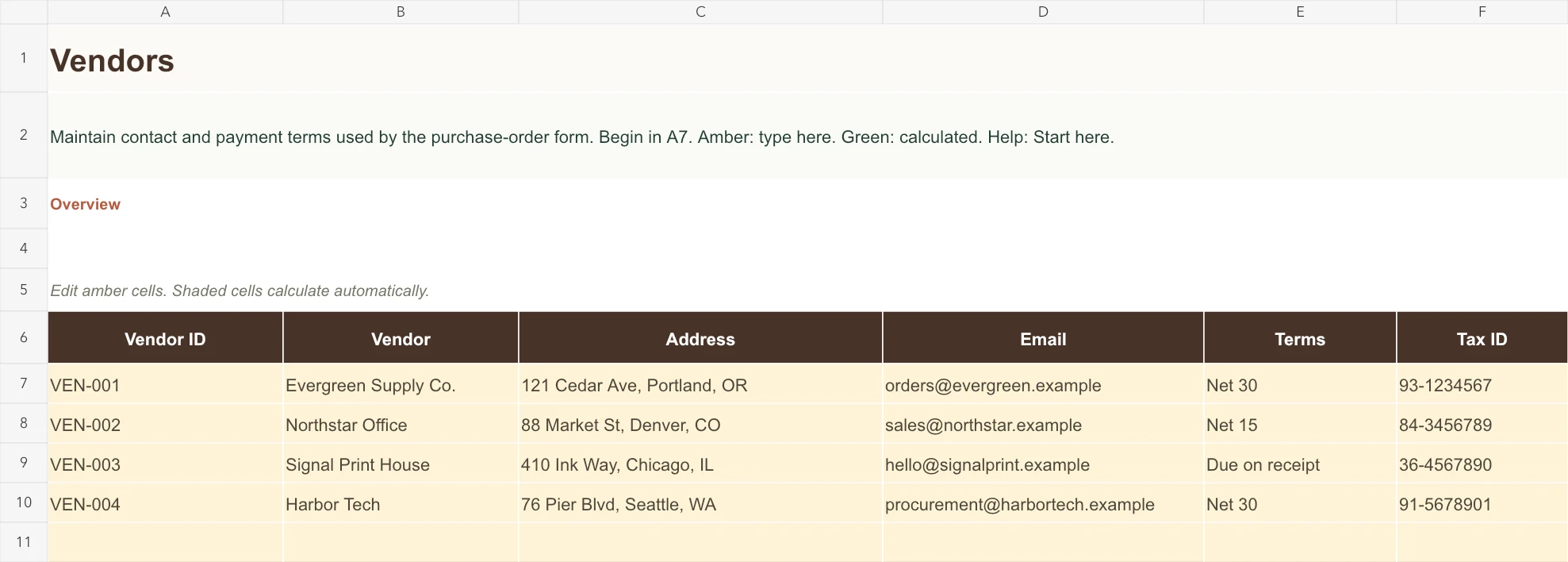
0:00 Vendors stores Evergreen Supply Co.’s address and Net 30 terms.
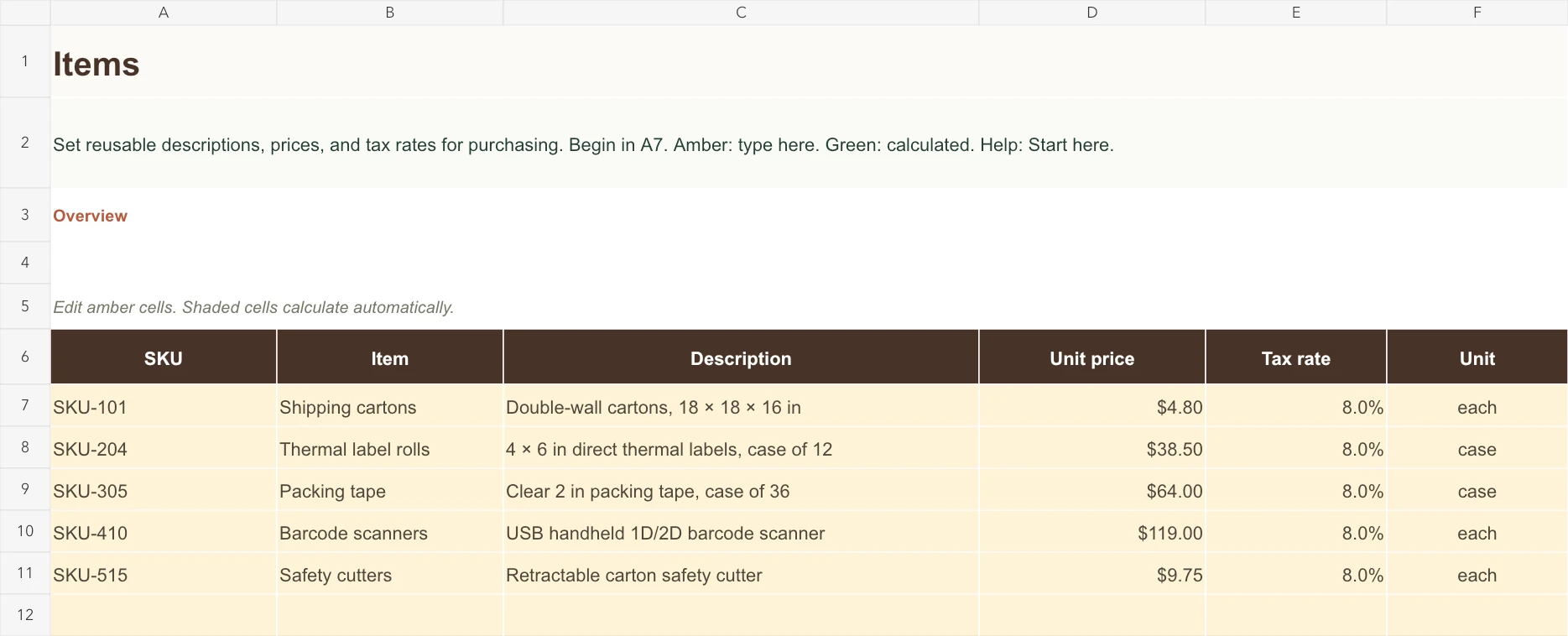
0:06 Items stores reusable SKU descriptions, prices, and example tax rates.
0:12 On Purchase Order, change the scanner quantity in D14 from 1 to 6.
0:17 The order recalculates: $1,060.40 goods + $84.83 tax = $1,145.23.
0:23 The form does not append to the register. Add the order manually in row 16.
0:28 Enter the dates, vendor, requester, department, and $1,145.23 total.
0:34 Choose Approved, Awaiting delivery, and Pending payment.
0:39 The spend tile rounds $11,536.88 to $11,537. Awaiting delivery is 4.
0:46 After receipt, choose Received. Awaiting delivery returns to 3.
0:49 Choose Paid after payment. Open orders stays 7 because approval is still Approved.
The shipped fictional example already contains Evergreen Supply Co. and five supply SKUs. Follow it first, then replace the examples with your records.
On Vendors, find Evergreen Supply Co. in B7. Its address, email, and Net 30 terms are in C7:E7.
On Items, rows 7–11 contain cartons at $4.80, labels at $38.50, tape at $64, scanners at $119, and cutters at $9.75. Each uses an illustrative 8% tax rate.
1Items!A7:F11 is the reusable SKU list. Prices and tax rates feed the form.
02
Prepare and check the complete purchase order
PO-2026-0101 is dated October 5, 2026, requested by Jon Bell, with delivery expected October 16. All names and dates are fictional.
On Purchase Order, select Evergreen Supply Co. in G4. Vendor details populate G5:G7.
Select SKU-101, SKU-204, SKU-305, SKU-410, and SKU-515 in B11:B15. Enter quantities 8, 2, 3, 6, and 4 in D11:D15.
Check I22:I24: subtotal $1,060.40, tax $84.83, total $1,145.23. The workbook retains unrounded calculation precision and formats money to cents. Review the printed amounts against your rounding policy.
Save the approved order separately and use Excel’s print preview or PDF export. Reusing the form changes its current content.
1G4 selects the vendor; G5:G7 are calculated lookups.
2B11:B15 and D11:D15 are SKU and quantity inputs.
3I22:I24 shows subtotal, example tax, and order total.
03
Record the order, then follow delivery and payment
This demonstration adds the form’s order to the next empty register row. This row is a follow-along addition, not an existing record in the original download.
In PO Register!A16:J16 enter PO-2026-0101, October 5, Evergreen Supply Co., Jon Bell, Operations, 1145.23, October 16, Approved, Awaiting, Pending.
The six existing sample orders total $10,391.65. Adding this order makes committed spend $11,536.88 and Awaiting delivery 4. The spend tile displays whole dollars, so it reads $11,537.
After receiving the goods, change I16 to Received. Once payment is confirmed, change J16 to Paid. Awaiting delivery returns to 3. Approval remains Approved, so the Open orders tile still counts this row.
A basic PO form can be enough when you only need a document to fill in and send.
What this $9 workbook adds
Choose this workbook when you also want reusable vendor details, SKU price lookups, calculated totals, and a register for following the order after you send it. These are included structures, not automatic integrations.
Prepared capacity
10 prepared line items per purchase order (rows 11–20).
20 vendor records and 20 item records (rows 7–26).
30 purchase-order register rows (rows 10–39).
Four working sheets plus the included Start here instruction sheet.
Supported behavior and limits
The register is entered manually. Preparing the form does not append or archive an order.
The form looks up current item prices. Preserve an approved order as a separate file or PDF before changing the item list or reusing the form.
The register’s Open orders tile counts Draft and Approved rows, including received or paid orders. Committed spend sums every entered total. Awaiting delivery counts Awaiting only, excluding Partial.
Example tax rates are illustrative inputs, not tax advice. No supplier sending, accounting sync, stock updates, payment processing, or approval notifications.
Prepared capacity describes the supplied ranges. Extending them requires reviewing formulas, dropdowns, summaries, and print layout.
Purchase Order Manager at a glance
Price
$9 USD, one time, before tax.
Intended user
Office managers, operations teams, and small businesses coordinating supplier orders.
Compatibility
Editable .xlsx for modern Microsoft Excel on Windows or Mac. No VBA macros. Other spreadsheet apps require import and review of formulas, charts, dropdowns, and layout.
Capabilities
Purchase-order form; PO register; Vendor database; Item and price list.
Limitations
The register is entered manually. Preparing the form does not append or archive an order. Approval: Draft, Approved, Declined. Delivery: Awaiting, Partial, Received. Payment: Pending, Paid. The form looks up current item prices. Preserve an approved order as a separate file or PDF before changing the item list or reusing the form. The register’s Open orders tile counts Draft and Approved rows, including received or paid orders. Committed spend sums every entered total. Awaiting delivery counts Awaiting only, excluding Partial. Example tax rates are illustrative inputs, not tax advice. No supplier sending, accounting sync, stock updates, payment processing, or approval notifications.
Purchase terms
USD, one-time payment. No subscription. Choose any 3 different templates for $24 or any 5 for $32. One or two templates cost $9 each; 3–4 cost $8 each; 5 or more cost $6.40 each. Mix any categories; the discount applies automatically to every workbook in the bag. Extra copies of the same template do not unlock a tier. Taxes are calculated at checkout. Download after successful payment, with account purchase history when signed in. Personal commercial use in your own business is included. Resale and redistribution of the template files are not permitted.
Make purchasing easier to follow from the first order to the final payment. Use reusable vendor and item information to prepare a purchase order, then keep the approval, delivery, and payment trail in a shared register.
Made for
Office managers, operations teams, and small businesses coordinating supplier orders.
01
Purchase-order form
02
PO register
03
Vendor database
04
Item and price list
One connected workbook
Take a look inside.
Start with the included guide, replace the example inputs, and review the calculated results.
01
Purchase Order
Prepare a purchase-order form for review, printing, or PDF export.
02
PO Register
Track orders and their approval, delivery, and payment status.
03
Vendors
Store reusable supplier names and contact details.
04
Items
Maintain item descriptions and prices used when preparing orders.
Does the workbook send purchase orders to suppliers?+
No. Prepare and check the order in Excel, then print it or export it to PDF and send it through your usual process. The register helps you track what happens afterward.
What will I receive after purchase?+
You receive the complete Purchase Order Manager as an editable .xlsx file with 4 worksheets, sample data, and live formulas. Your paid order confirmation includes download links. Sign in to your GridMori account to keep purchased workbooks together in your library.
Do I need a subscription?+
No. This workbook is a one-time $9 purchase. Choose any 3 different GridMori templates for $24 or any 5 for $32. Your bag applies $8-each pricing for 3–4 templates and $6.40-each pricing for 5 or more. Taxes are calculated at checkout.
Which spreadsheet app is it designed for?+
Editable .xlsx for modern Microsoft Excel on Windows or Mac. No VBA macros. Other spreadsheet apps require import and review of formulas, charts, dropdowns, and layout.
Can I customize the workbook for my business?+
Yes. Replace the example data, edit the input fields, and adapt the labels and appearance for your own work. Keep an original copy and check formulas and chart ranges when extending the prepared structure. A personal commercial-use license is included; it does not permit resale of the template.
Before you buy
Your file, license, and download help
Purchase
$9 USD once, before tax. An editable Excel .xlsx file after successful payment. No subscription. Mix any three different templates for $24 or five for $32.
License
Use and customize the workbook in your own business. Resale and redistribution of the template file are not permitted.
Download help
Keep your private order-confirmation link. If an automatic download is blocked, use its manual download button. Signed-in buyers can also reopen their purchase library. Keep receipt links private.
Workbook help
Use the included Start here sheet or the public workbook guide. Save an original copy before replacing sample data.
Payment support
For receipts marked “Sold through Link,” use Link’s purchase support for payment questions. Guest buyers can also contact Link support without creating an account. Keep your receipt available. Open Link purchase support.
Refund requests
For orders marked “Sold through Link,” request a refund through Link support. Its policy covers certain delivery, product, and payment problems reported within 60 days. Eligibility and local consumer rights apply. This is not an unconditional money-back guarantee. Read eligibility and request a refund.
 Open full-size worksheet
 Open full-size worksheet